Got constraints? Perfect. That’s where great design begins. Just as electrical standards define how a toaster safely works without shaping what it does, your software also lives within boundaries that quietly guide its behavior. Functional requirements describe what your system does: the stories of use, the features your users see. However, non-functional requirements define how it must work: securely, accessibly, and efficiently. When you treat these constraints as design allies rather than obstacles, you make smarter choices, avoid costly rework, and build products that feel solid, consistent, and ready for anything.
In this video, William Hudson, User Experience Strategist and Founder of Syntagm Ltd, explains how constraints, or non-functional requirements, define essential qualities such as accessibility, security, and device support that guide your product’s design.
Show
Hide
video transcript
- Transcript loading…
What are Constraints?
Constraints, also known as non-functional requirements, are the conditions or limits that shape how you can design or build your solution. They don’t define what a system does, but rather how it must work, such as performance targets, legal requirements, supported devices, or accessibility standards. In short, constraints set the boundaries within which design and development must operate.
As the diagram below shows, non-functional requirements are split into two kinds of constraints.
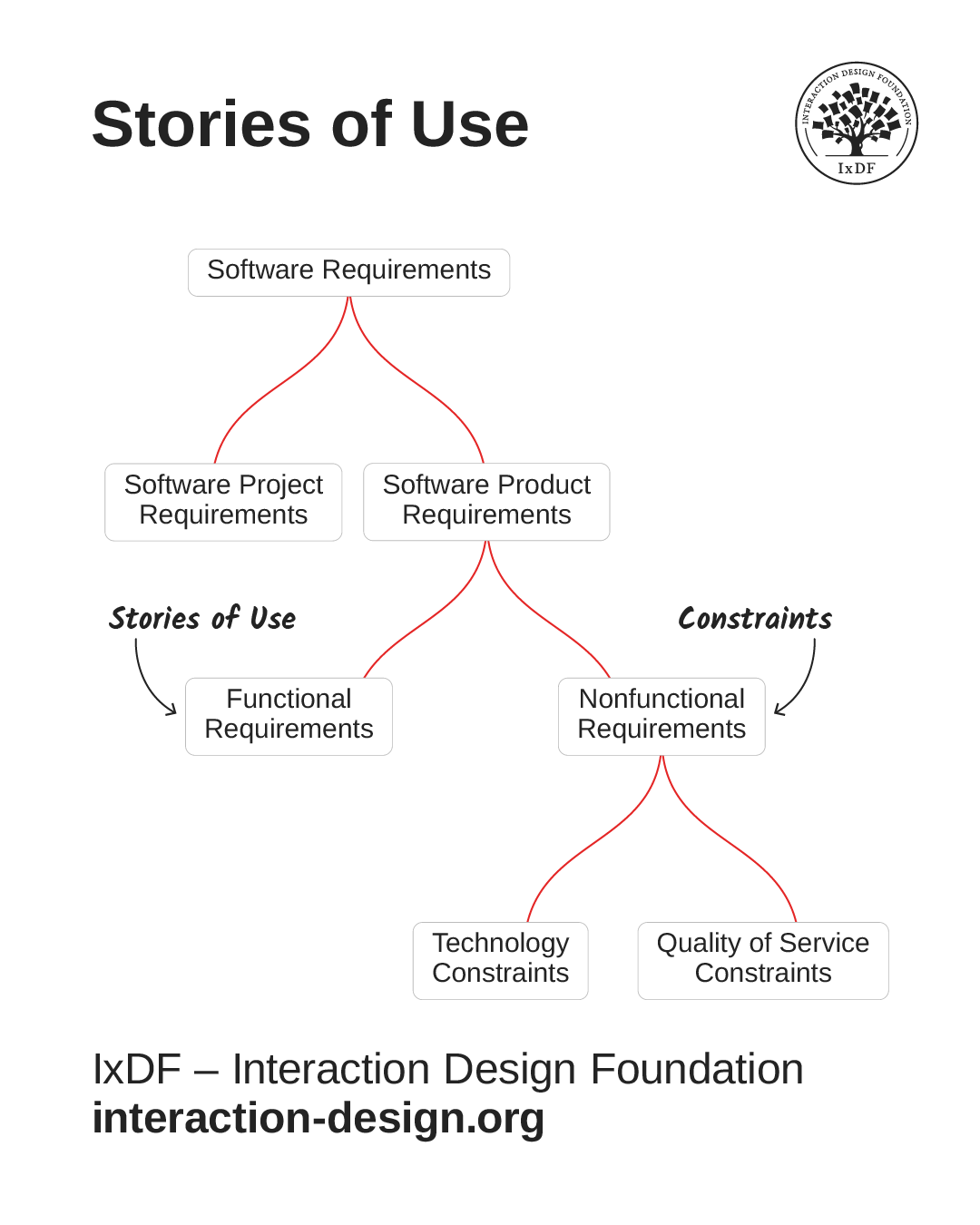
Stories of use, such as user stories and use cases, mostly come from functional requirements. However, non-functional requirements are still essential to good UI design. Many of the design decisions you make will be based on constraints, and they will help you avoid rework, feature bloat, and unexpected limitations during handoff.
© Adapted from the Software Engineering Book of Knowledge V4 by Interaction Design Foundation, Fair use
Technology Constraints
Technology constraints have little or no impact on a solution's functionality from a user’s perspective. They're choices about what programming language will be used, what platforms will be supported and other implementation details.
However, some technology constraints are directly relevant to UI design. For example, the decision to support mobile devices will significantly influence how you approach a solution's visual and interface design.
Quality of Service Constraints
Quality of service constraints cover a broad collection of characteristics. Here's a common categorization:
Performance
Scalability
Portability
Compatibility
Reliability
Availability
Maintainability
Security
Localization
Some of these can affect your stories of use directly. For example:
Security requirements may mean that your users need to log in each time they access a solution or that they must establish two-factor authentication. An example story of use for this constraint would be, "Rachel chooses her desired form of two-factor authentication."
Localization requirements may mean you need to create stories around users choosing the language of interaction.
Notice that the final entry in the list is usability! Since constraints must be measurable, it isn't enough to say that “the solution should be usable.” Instead, you would see a requirement like this: "90% of users must be able to complete key tasks in 60 seconds or less.”
Finally, accessibility isn't explicitly mentioned, but it typically falls under the category of usability. An example requirement would be: “Solution must comply with WAI WCAG 2.x at Level AA.”
Functional vs Non-Functional Requirements: What's the Difference?
An easy way to see the difference between functional and non-functional requirements is with an example, a little simpler than an interactive software solution: a pop-up toaster.
The number of slots in a given model is a functional requirement as it directly affects the stories of use we write about it. For example, "Javier makes toast for his whole family." How the slots are configured is also a functional requirement since that can make it possible for two people to use the toaster simultaneously.
On the other hand, the kind of electrical system a toaster is compatible with is a non-functional requirement. A toaster is either made to work in the USA or the UK, or it isn’t. Because the plugs and voltages differ, a toaster made for one country won’t work in the other. Travel adapters don’t help because the voltages are quite different, and the amount of power required is substantial.
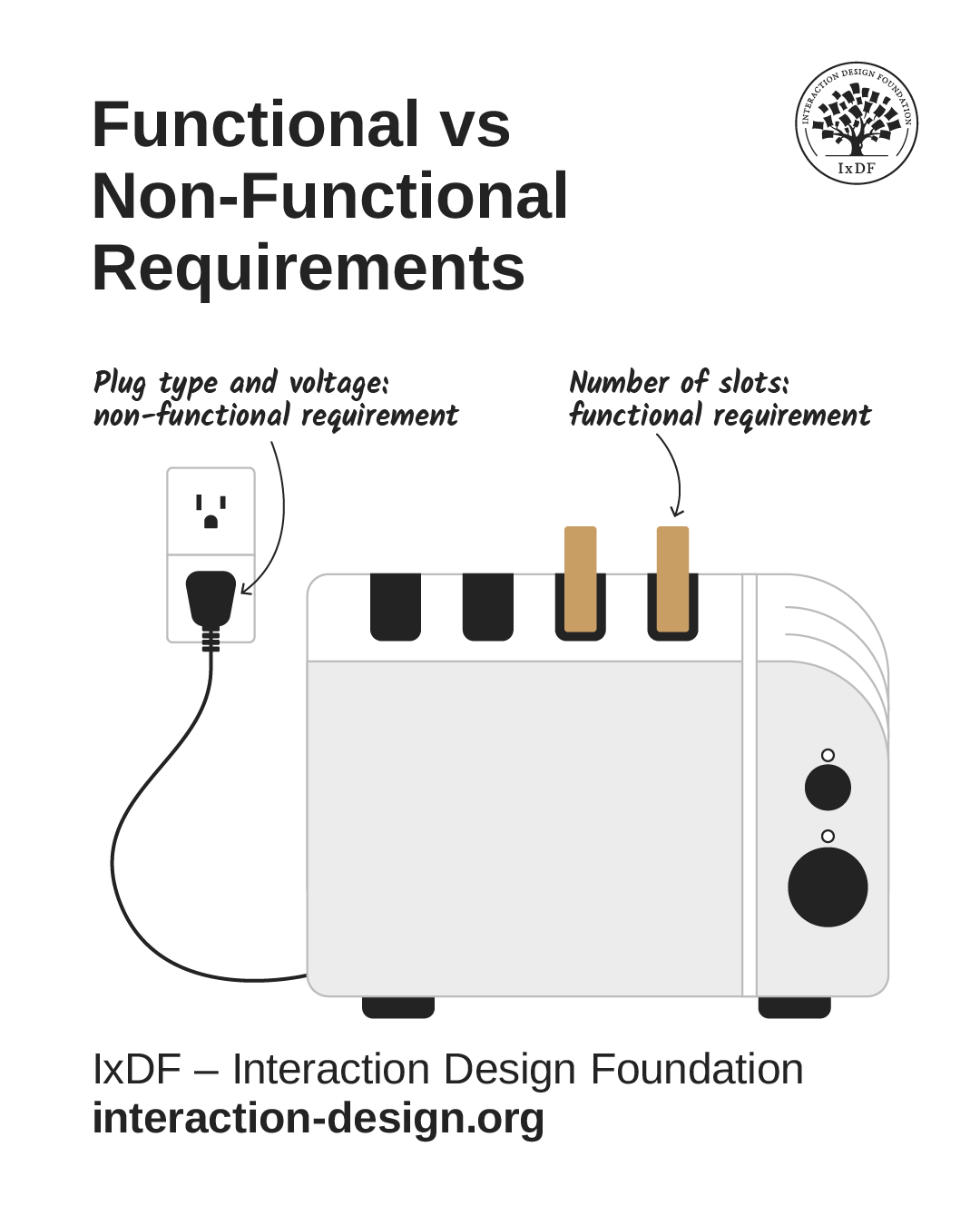
Just like software solutions, appliances of any type have many functional and non-functional requirements (constraints).
© Interaction Design Foundation, CC BY-SA 4.0
Many non-functional requirements affect only how a solution is implemented, which has little or no impact on how it works. For example, a social networking solution with end-to-end encryption will have little or no impact on functionality. It’s invisible to users.
The Take Away
Constraints, also known as non-functional requirements, define the essential qualities your solution must meet. They’re grouped into technology constraints and quality-of-service characteristics, such as security, localization, and usability. These aren’t just technical details; they directly shape how your product looks, feels, and performs for users.
When you understand and design with constraints in mind, you prevent surprises later, such as last-minute rework or usability gaps, and ensure your solution works smoothly in the real world. Some constraints may even reveal new or adjusted functional requirements, helping you create designs that aren't only functional but genuinely reliable and user-centered.
When you master this balance between what your system does and how it must work, you can turn limitations into direction and design decisions into lasting value for your users.
Hero image: © Interaction Design Foundation, CC BY-SA 4.0