About the authors

Picture of Margaret M. Burnett. © Margaret M. Burnett
Margaret Burnett is a Professor of Computer Science at the School of Electrical Engineering and Computer Science at Oregon State University. Her current research focuses on end-user programming, end-user software engineering, information foraging theory as applied to programming, and gender issues in those contexts. She has a long history of research in these issues and others relating t...   
Read more >> 
Picture of Christopher Scaffidi. © Christopher Scaffidi
Christopher Scaffidi is currently an Assistant Professor of Computer Science in the School of EECS at Oregon State University. His research interests are where human-computer interaction and software engineering intersect. Most of his current projects aim to help software users to create code for themselves, and to effectively share that code with one another. He is presently serving ...   
Read more >> 

Commentaries by:


Alan Blackwell

Picture of Alan Blackwell.

I only have one big research question, but I attack it from a lot of different angles. The question is representation. How do people make, see and use things that carry meaning? The angles from which I attack my question include various ways in which r...

More about Alan >>
 

Mary Beth Rosson

Picture of Mary Beth Rosson.

I am a Professor of Information Sciences and Technology, and Affiliate Professor of Instructional Systems in the College of Education. With Dr. John Carroll, I co-direct the Computer-Supported Collaboration and Learning (CSCL). I am also a founding member of P...

More about Mary >>
 

Editors of this chapter:


Anne Marie Kanstrup

Picture of Anne Marie Kanstrup. Copyright of Anne Marie Kanstrup and Interaction-Design.org through the Creative Commons Share-Alike licence.

Anne Marie Kanstrup is Associate Professor at the Dept. of Communications, Aalbo...

Read more >>
 

Mads Soegaard

Picture of Mads Soegaard. Copyright of Mads Soegaard and Interaction-Design.org through the Creative Commons Share-Alike licence.

Previously, I've worked at The Danish National Technological Institute worki...

Read more >>
 

Rikke Friis Dam

Picture of Rikke Friis Dam. Copyright of Rikke Friis Dam and Interaction-Design.org through the Creative Commons Share-Alike licence.

Rikke Dam holds a Master's Degree in philosophy from the University of Aarhus, a...

Read more >>
 

Peer Reviewers

Reviewer 1: Name suppressed
Reviewer 2: Name suppressed

Peer-review is based on the reviewing guidelines and coordinated by the Reviewing Board.

Get Notified!

Get notified when new chapters are added to the encyclopedia!

Your Email
 

Featured chapter

Authoritative overview of Social Computing by Tom Erickson - veteran researcher at IBM Research Lab. It includes 9 HD videos filmed in Copenhagen.

Read Thomas's chapter

10. End-User Development


Computer users have rapidly increased in both number and diversity (Scaffidi et al 2005). They include managers, accountants, engineers, home makers, teachers, scientists, health care workers, insurance adjusters, salesmen, and administrative assistants. Many of these people work on tasks that rapidly vary on a yearly, monthly, or even daily basis. Consequently, their software needs are diverse, complex, and frequently changing. Professional software developers cannot directly meet all of these needs because of their limited domain knowledge and because their development processes are too slow.

End-user development (EUD) helps to solve this problem. EUD is "a set of methods, techniques and tools that allow users of software systems, who are acting as non-professional software developers, at some point to create, modify, or extend a software artifact" (Lieberman et al 2006). In particular, EUD enables end users to design or customize the user interface and functionality of software. This is valuable because end users know their own context and needs better than anybody else, and they often have real-time awareness of shifts in their respective domains. Through EUD, end users can tune software to fit their requirements more closely than would be possible without EUD. Moreover, because end users outnumber professional software developers by a factor of 30-to-1 (Figure 10.1), EUD "scales out" software development activities by enabling a much larger pool of people to participate.

However, EUD is inherently different from traditional software development, and trying to support EUD by simply mimicking traditional approaches is often insufficient to produce successful results. End users usually do not have training in professionals' programming languages, formal development processes, or modeling and diagramming notations. Moreover, end users often lack the time or motivation to learn these traditional techniques, since end users usually write code in order to achieve a short- or medium-term goal rather than to create a durable software asset that will produce a continuing revenue stream. Consequently, supporting EUD requires providing appropriate tools, social structures, and development processes that are highly usable, quickly learned, and easily integrated into domain practice.

EUD overlaps with two similar concepts, end-user programming and end-user software engineering. End-user programming (EUP) enables end users to create their own programs (Ko et al 2011). This subset of EUD is the most mature from a research and practice perspective, so we focus a later section of this article on that portion of EUD. The difference between EUP and EUD is that EUD methods, techniques, and tools span the entire software development lifecycle, including modifying and extending software, not just the "create" phase.

The other related concept overlapping with EUD is end-user software engineering (EUSE). EUSE is a relatively new subset of EUD that began about a decade ago. Its emphasis is on the quality of the software end users create, modify, or extend; thus its research focuses on methods, techniques, and tools that promote the quality of such software. This area has arisen because of the ample evidence that the programs end users create are filled with expensive errors (Panko 1998; Burnett 2010; Ko et al 2011). We therefore focus on the EUSE subset of EUD in a later section of this article.
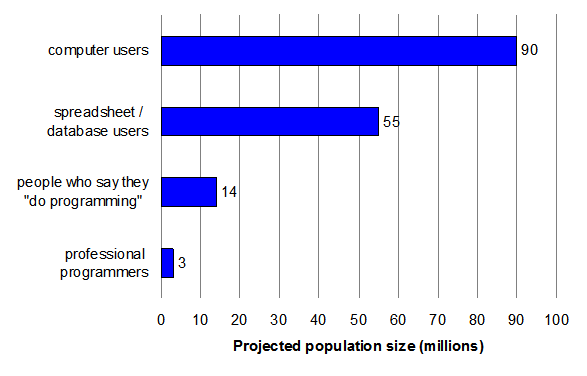
Projected population sizes for American workplaces in 2012, based on federal data (note that categories are not mutually exclusive).
Figure 10.1: Projected population sizes for American workplaces in 2012, based on federal data (note that categories are not mutually exclusive).
Video 10.1: End-User-Development - Introduction to End-User Development.
Video 10.2: End-User-Development - Three Pieces of Advice Three Major Pitfalls and Three Best Practices.
Video 10.3: End-User-Development - Business Value - Applicability in Industry.
Video 10.4: End-User-Development - Gender Differences in End-User Development.
Video 10.5: End-User-Development - Future Directions.

10.1 The birth of EUD

Prior to the 1980's, most computing occurred on mainframes controlled by professional developers in information systems departments. End users had little influence over the form and function of software running on a mainframe, which they generally viewed through simple terminal windows and controlled with simple textual commands (Figure 10.2). Information systems departments rarely had enough staff time to design and implement all of the software enhancements requested by users (Brancheau & Wetherbe 1987).

EUD grew out of a confluence of innovations embodied in the machines known as "microcomputers" (a term eventually replaced with "personal computer"). First, these machines were inexpensive enough that organizations could afford to provide each user with a machine. Having their own machines made it viable for users to modify ("tailor") the machine's software settings without impacting the computing environment of other users. Second, microcomputers had sufficient hardware power so that users could compile (or interpret) new code in languages such as Basic. This in turn provided infrastructure for end users to create new applications. Third, microcomputers soon came to include innovative new features such as the mouse and powerful graphics cards, which accelerated usability advances such as graphical user interfaces (GUIs) and direct manipulation; these advances, in turn, opened up the possibility of novel programming tools specifically designed to meet the needs of users.

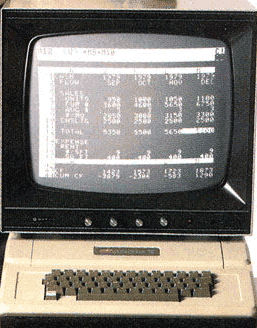
Spreadsheets were the first major EUD programming environment made possible by these innovations (Bricklin et al 1979), beginning with VisiCalc (Figure 10.3), then continuing with Lotus 1-2-3 and Excel. Although users of spreadsheet systems may not think of themselves as "doing programming," spreadsheet systems are programming environments because their formulas are first-order functional programs (Jones et al 2003). In such programs, the formulas can refer to input "variables" (cell names) and the results of the formulas are computed output values. The availability of spreadsheet software was a major factor in spurring early demand for microcomputers (Ichbiah 1993). Newer technologies such as the web and mobile computing have since opened up increasingly diverse and powerful opportunities for end users to create and tailor software.
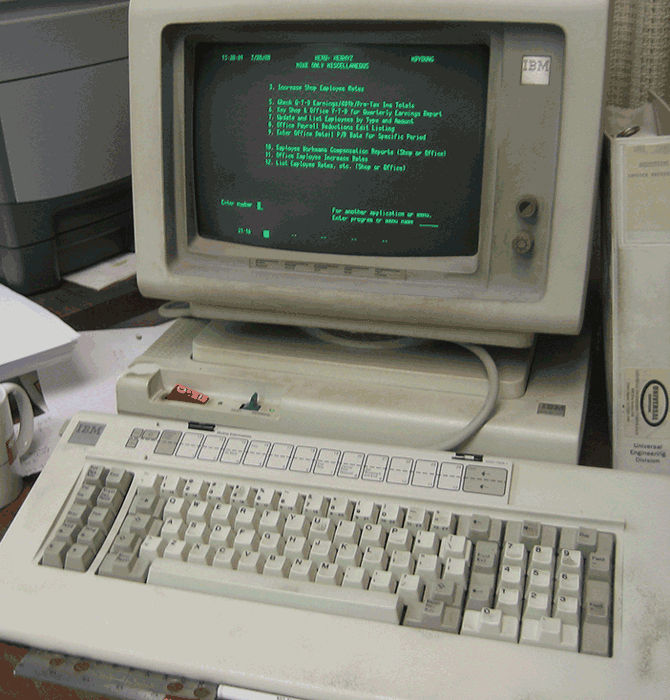
Terminal interface presenting a fixed menu, where users type a number to indicate a menu selection.
Figure 10.2: Terminal interface presenting a fixed menu, where users type a number to indicate a menu selection.
Visicalc circa 1980.
Figure 10.3: Visicalc circa 1980.

10.2 Tailoring

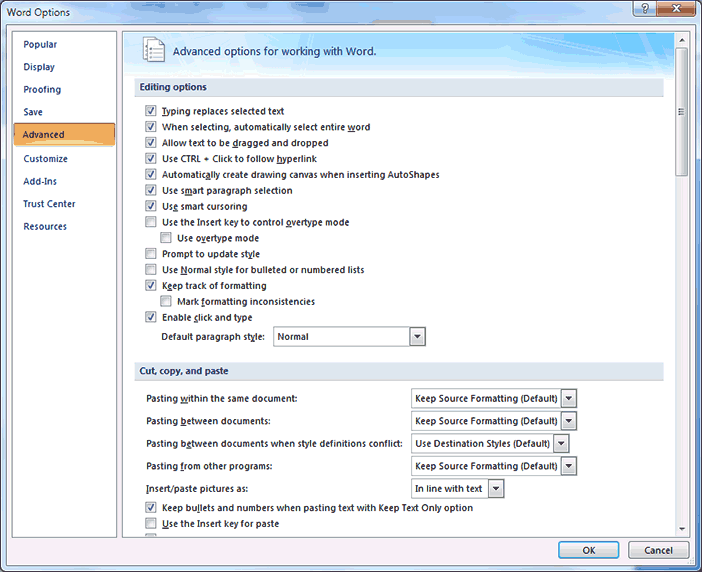
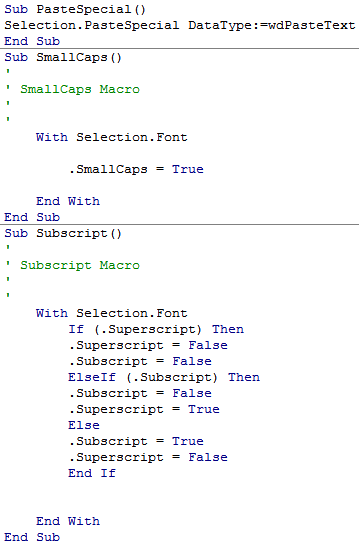
Tailoring is any "activity to modify a computer application within its context of use" (Won et al 2006). Tailoring can be a simple or complex activity. At each increased level of complexity, users have more ability to redesign the interaction and functionality of an application. At the most basic level, tailoring encompasses specifying parameters to an existing application in a way that changes its behavior at a high level of granularity. For example, a person might use a graphical user interface to indicate which features of a spreadsheet editor should be visible (Figure 10.4) or how a word processor should respond to various inputs (Figure 10.5). Once tailoring begins to involve creating full-fledged programs in order to extend the functionality of an application, the activity seamlessly encompasses end-user programming (below). For instance, a user might create scripts called "macros" that manipulate the buttons, text, or other graphical user interface elements within an application. Such macros can extend applications with new functionality or make existing functionality more usable (Figure 10.6). Researchers have proposed a variety of component-based frameworks that can be used to implement easily-tailored applications (Won et al 2006). For instance, the "Selection" object referenced in Figure 10.6 is actually a component representing the region of text that is currently highlighted by the user in the word processor. The component-based framework makes it possible for an interpreter to manipulate the highlighted text in response to macros' instructions.
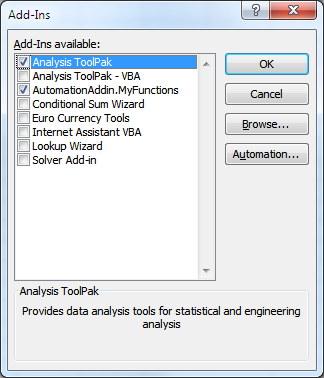
Screen in Microsoft Excel for tailoring which features should be activate and visible.
Figure 10.4: Screen in Microsoft Excel for tailoring which features should be activate and visible.
Screen in Microsoft Word for tailoring how the application handles clicks on hyperlinks, copy/paste commands, and other kinds of user input.
Figure 10.5: Screen in Microsoft Word for tailoring how the application handles clicks on hyperlinks, copy/paste commands, and other kinds of user input.
Using a code editor to create three Microsoft Word text-manipulation macros that are linked (through a separate screen) to keyboard shortcuts; for example, the first macro has a single instruction indicating that the application should convert whatever is on the system clipboard into a textual representation and then paste it into the document.
Figure 10.6: Using a code editor to create three Microsoft Word text-manipulation macros that are linked (through a separate screen) to keyboard shortcuts; for example, the first macro has a single instruction indicating that the application should convert whatever is on the system clipboard into a textual representation and then paste it into the document.

10.3 End-user programming (EUP)

End-user programming (EUP) is defined as "programming to achieve the result of a program, rather than the program itself" (Ko et al 2011). In EUP, the developer's goal is to actually use the program; this contrasts with professional programming, where the goal is to create a program for other people to use, often in exchange for monetary compensation. The programs created through EUP can be extensions of existing applications (as in Figure 10.6, above), or they can be new applications that run separately from existing applications. End users can perform EUP through a wide range of interaction styles (Nardi 1993), as we discuss next.

10.3.1 Programming using visual attributes

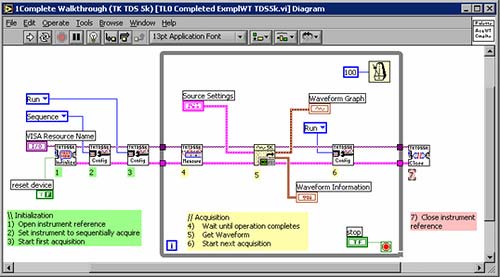
In environments supporting the visual programming style of interaction, at least some of a program's semantics is expressed through the visual layout of the program. For example, the grid-like arrangement of cells in a spreadsheet carries a certain semantics; specifically, cells that are vertically or horizontally aligned with one another are part of a composite object defined solely based on the visual layout of cells (e.g, the range B:B references all of the second column in Microsoft Excel). In a visual language, semantics can hypothetically be encoded in many attributes of a visual representation, such as position, color, size, and intersection with other shapes. As another example, Figure 10.7 shows a visual language where each instruction is a colored block whose color indicates what kind of instruction it is and whose shape indicates what other blocks can appear next or before this block. Figure 10.8 shows a third example of a visual language. As with many visual languages, the LabView programming tool allows users to drag and drop these shapes using the GUI. Another common way of interacting through a visual language is with a form (Figure 10.9). In such an interface, the user cannot freely drag and drop shapes but rather must make selections from pre-defined fields.
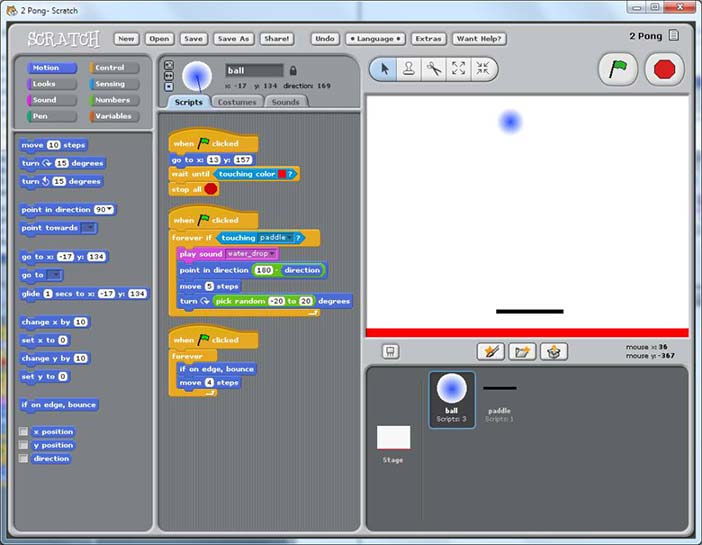
Visual interface for editing the three scripts for the ball in a 'pong' game animation. The programmer lays out sprites on the right; clicking a sprite brings up its scripts for editing in the center. Primitives can be dragged-and-dropped from the toolbox at left. (Resnick et al 2009).
Figure 10.7: Visual interface for editing the three scripts for the ball in a 'pong' game animation. The programmer lays out sprites on the right; clicking a sprite brings up its scripts for editing in the center. Primitives can be dragged-and-dropped from the toolbox at left. (Resnick et al 2009).
LabVIEW programming language for creating circuit simulations and other programs. Each box represents a computational component, while lines indicate flow of data (similar to wires carrying signals).
Figure 10.8: LabVIEW programming language for creating circuit simulations and other programs. Each box represents a computational component, while lines indicate flow of data (similar to wires carrying signals).
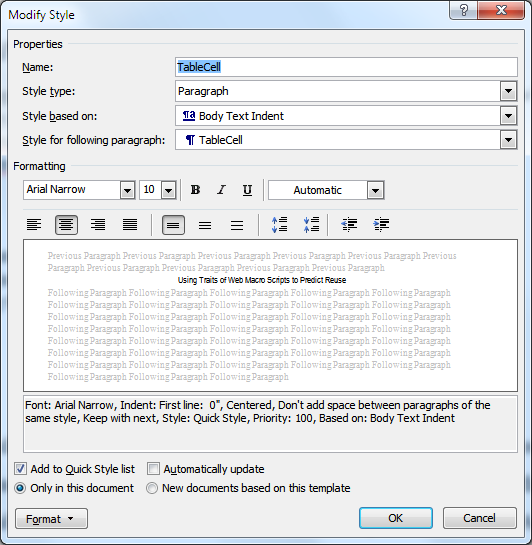
User interface in Microsoft Word for creating a style, which is a set of formatting instructions that will be applied to multiple labeled regions in the document.
Figure 10.9: User interface in Microsoft Word for creating a style, which is a set of formatting instructions that will be applied to multiple labeled regions in the document.

10.3.2 Programming-by-demonstration (PBD)

Programming-by-demonstration (PBD), sometimes called programming-by-example, is a programming technique whereby the user demonstrates the new program's logic, from which the programming environment infers a program representing that logic. Some PBD systems are able to deductively infer the entire program, while others deduce what they can and ask the user for help for the rest (Cypher 1993). PBD-based tools are available for creating animations (Repenning & Perrone 2000; McDaniel & Myers 1999) and many other kinds of programs (Cypher 1993). One problem with PBD has been representing the final program in a form useful to the user (Cypher 1993; Yang et al 1997), to enable the end-user developer to review, test, and debug the program. Thus, PBD is often used in combination with visual or textual languages.

For example, a user could create a Microsoft Word macro (like those shown in Figure 10.6) through PBD. The user would first click a button or menu item indicating that the application should start watching the user's actions. The user would then use the GUI to demonstrate the desired behavior for the macro; for example, the user might use a series of menu items and dialog windows to paste the system clipboard as text. The user would click the "stop recording" button so that Microsoft Word stops watching the user's actions. At that point, the application would generate a macro containing VBScript instructions for repeating the demonstrated actions. The user could give the macro a keyboard shortcut and a name, if desired, in order to simplify running or editing it later. In addition, the user might want to edit the macro's instructions so that they perform a task slightly different than the one that was demonstrated, particularly if the user wants the macro to complete a task that is impossible with the existing GUI (rather than merely hard-to-use). In this way, the user could add completely new functionality to an application, with PBD serving to provide a starting point for another approach to programming.

10.3.3 Programming-by-specification

Programming-by-specification is an interaction style where the user describes a desired program, and a tool then generates the program for the user. As in PBD, the generated program can then be represented to facilitate review and customization by the user. For example, Liu & Lieberman (2005) implemented a system that accepts a specification in natural language and generates a corresponding program written in Python. A key limitation of this approach, as with inference-based PBD approaches, is that it is difficult for a user to predict what program will be generated from any particular input. Another is that, as with PBD, representation can be a difficult issue. For example, if the input interaction is done with English but the output is a traditional programming language such as Python, the end user must be fluent in both languages. Another limitation is that the programming tool can often correctly process only a limited range of inputs. This restricts the usefulness of the tool and also makes it difficult for a user to predict whether (and how) some particular input will be "understood" by the tool (e.g, could the Liu and Lieberman tool mentioned above generate games, and if so, what kinds of games?) In order to make the bounds of a tool's input language more obvious to users, some systems provide a forms-based visual interface (Figure 10.10) rather than a textual interface, thereby restricting users' specifications to only those that can actually be handled by the tool (Scaffidi et al 2009).
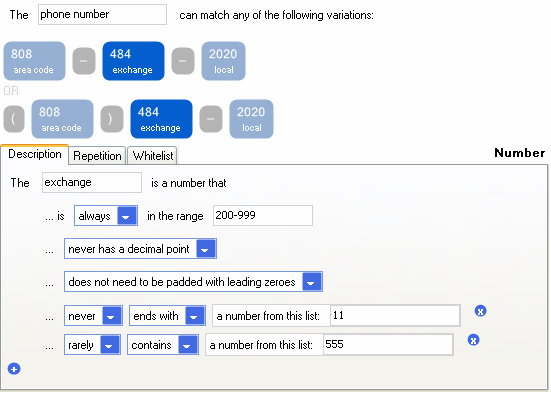
Visual specification of what a phone number looks like; from this specification, the tool generates code that can check whether a particular string matches the specification (Scaffidi 2009).
Figure 10.10: Visual specification of what a phone number looks like; from this specification, the tool generates code that can check whether a particular string matches the specification (Scaffidi 2009).

10.3.4 Programming with text

Programming with text is the most traditional interaction technique for programming, and for a time, some believed that this style of programming would not be appropriate for EUP. However, as the previous examples have shown, most programming environments that support other interaction styles also include text to some extent. As another example, Figure 10.11 shows the textual language that the CoScripter tool uses to represent a web macro, which is a script that directs a web browser to navigate the web and manipulate web sites in a particular way (Leshed et al 2008); such a web macro is typically created through PBD and then customized in textual form as needed. Despite the proliferation of alternative interaction styles, text remains widely used because of its conciseness and effectiveness for communicating abstract concepts.
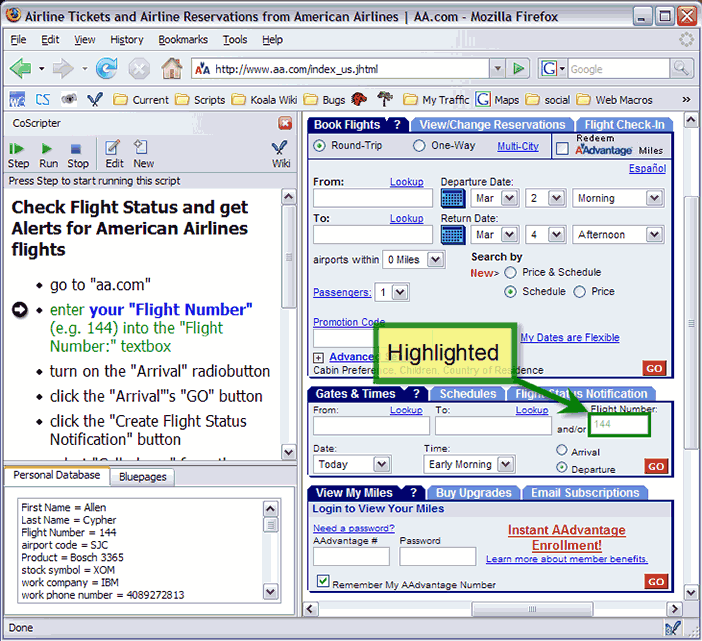
Using the CoScripter programming tool to edit a web macro that tells the browser to look up information on the American Airlines website. The macro's execution has been paused at the second instruction (left), which instructs CoScripter to highlight Flight Number on the web page (right) and fill it in from the user's 'Personal Database' configuration file (lower left). Scaffidi et al 2010.
Figure 10.11: Using the CoScripter programming tool to edit a web macro that tells the browser to look up information on the American Airlines website. The macro's execution has been paused at the second instruction (left), which instructs CoScripter to highlight Flight Number on the web page (right) and fill it in from the user's 'Personal Database' configuration file (lower left). Scaffidi et al 2010.

10.4 End-user software engineering (EUSE)

End-user software engineering (EUSE) is defined as "end-user programming involving systematic and disciplined activities that address software quality issues" (Ko et al 2011). Attention to quality is important for EUP because poorly-written software can cause data loss, security breaches, financial loss, or even physical harm, even when the software is created by end-user developers. The software qualities relevant to EUSE are the same as those of interest to professional developers who sell their products. These qualities include reliability, performance, maintainability, reusability, privacy, and security. Some qualities, such as maintainability and reusability, only become apparent after a program has been written and in operation for some time. Thus, EUSE combines the goal of EUP, which focuses on enabling end users to create software, with the concern for quality of that software across its entire lifecycle. This lifecycle includes requirements, design, verification, debugging and code reuse (in addition to actual implementation, which has already been described above in the context of EUP tools).

10.4.1 Requirements and design

Requirements describe what a program should do, and design refers to determining how a program should do it. For example, a requirement might be that a program should be able to sort a list of mailing addresses, and its design might detail the sorting algorithm to be used.

Examples of requirements (goals) in EUD include personalizing the way that an application or computer behaves, automating time-consuming tasks, performing computations that are hard to do accurately by hand, or communicating information (Ko et al 2011; Blackwell 2004; Blackwell 2006; Rosson et al 2002). Getting these requirements right is a critical aspect from the perspective of EUSE, because of its emphasis on quality. Professional developers are expected to investigate, document, and refine requirements before they start to design or code an application. For example, they might try to identify inconsistencies in requirements by applying one of several painstaking techniques (e.g, stakeholder review or formal modeling). In contrast, end users often live in their domain every day and know it very well, so they often already have an idea about what the requirements, and do not do any extra work to arrive at them, document them, or check them.

However, sometimes end users do not know the requirements in advance and do not aspire to a "design" per se; they may expect these matters to be clarified as the program's implementation evolves (Costabile et al 2006; Fischer & Giaccardi 2006; Morch and Mehandjiev 2000; Segal 2007). (Professional developers sometimes do not know the requirements in advance either, but they are expected to take steps to deal with that situation, such as employing an iterative method that fills in requirements as prototypes evolve, rather than entirely omitting the concept and moving on.) In this case, end-user developers may jump directly into coding without taking the time to document their requirements or look for inconsistencies (Rosson et al 2010). A related situation is that, because of the tight coupling of EUD to a domain, external shifts in the domain can cause evolution in requirements; for example, changes to accounting rules might require a financial analyst to compute different data, which might in turn cause modifications to an existing spreadsheet. Due to its highly iterative nature, EUD requirements-refinement has been likened to a form of highly agile programming (Lieberman et al 2006).

Thus, end-user programmers' requirements tend to be emergent and tightly intertwined with design. Given this, many design approaches that have been targeted toward end-user programmers aim to support evolutionary or exploratory approaches. DENIM is one example (a sketching system for designing web site), which allows users to leave parts of the design in a rough and ambiguous state until that section is better understood (Newman et al 2003). The process of exploratory design can also be assisted by a design critic, which is a software feature that can review a user's design and give suggestions for improvement (Figure 10.12). For example, Janus is a tool with a visual language enabling users to design floor plans for homes (Fischer et al 1990). It contains a design critic with an extensible expert system that can identify suboptimal combinations of objects in floor plans and suggest revisions to fix those design problems. It also displays a rationale for each suggestion, so that the user can reason about whether and how to apply the advice.

Another approach is for less experienced end-user developers to seek a review from more experienced peers. By identifying short lists of best practices and providing appropriate tools, researchers have tried to make this review as efficient as possible so that it can be applied without greatly slowing the EUD lifecycle (Ronen et al 1989; Powell & Baker 2003; Rosson et al 2008). Such an approach seems most likely to be successful in an organizational setting, where end-user developers have peers that they can call upon (and where the management hierarchy can be used, if appropriate, to mandate and enforce design reviews). Another variant of this idea that has emerged recently is meta-design, a team-of-equals collaborative approach in which professional developers handle some of the design task, and end-user domain experts handle different aspects (Fischer & Giaccardi 2006; Costabile et al 2006).

Researchers have also begun to explore approaches for adapting existing software engineering design techniques to the EUD context. For example, design patterns might be relevant but need adaptation to meet the needs of end-user developers (Diaz et al 2008). Another relatively new approach is the combination of design/specifications with verification capabilities, as with the Topes system discussed earlier (Scaffidi 2009).
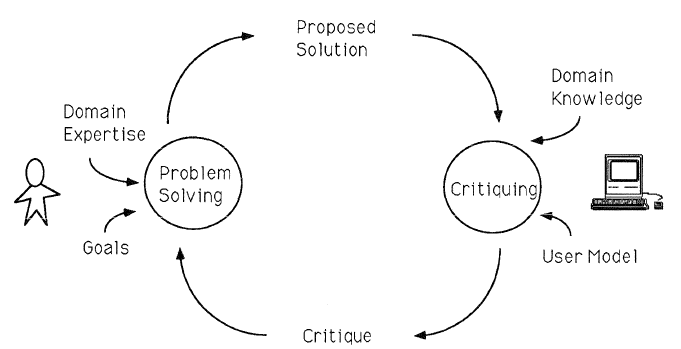
Overview of the design critic process, where the user specifies a proposed design/solution, which the design critic feature (right) reviews based on encoded domain knowledge and a model of the user's goal (Fischer et al 1990).
Figure 10.12: Overview of the design critic process, where the user specifies a proposed design/solution, which the design critic feature (right) reviews based on encoded domain knowledge and a model of the user's goal (Fischer et al 1990).

10.4.2 Verification and validation

Verification and/or validation (V&V) cover activities attempting to make sure that a program does what it is supposed to do. Testing is the most common approach for V&V (even among professional developers). One of the first works supporting V&V in EUD was to help users evaluate whether their programs contained bugs by encouraging end users to test strategically. Perhaps the most developed end-user testing approach is "What You See Is What You Test" (WYSIWYT), which guides users through the process of systematically testing spreadsheets (Fisher et al 2006). WYSIWYT employs a "Surprise-Explain-Reward" strategy (Wilson et al 2003), in which surprises such as colored borders attract users' attention to areas of the spreadsheet that need testing, and tool tips explain the colors' meaning and the potential reward in using the testing devices (Figure 10.13). Behind the scenes, WYSIWYT uses a formal test adequacy criterion to reason about elements of the formulas that have been covered by tests so far.

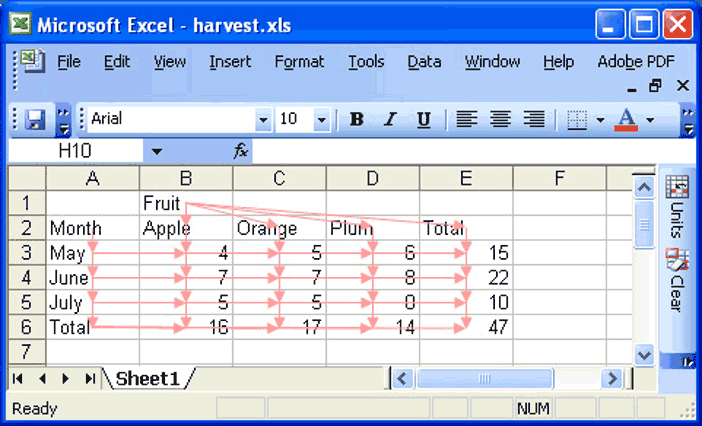
An alternative approach for finding errors in programs is for the programming tool to automatically look for errors on the basis of types, dimensions, or units (Erwig & Burnett 2002; Abraham & Erwig 2007; Coblenz et al 2005; Chambers & Erwig 2009). This approach can be regarded as specific kinds of assertions. For example, one system associates types with spreadsheet cells (based on the placement of labels at the top of columns and at the left end of rows) and specifies how these types propagate through the spreadsheet (Figure 10.14). If two cells with different types are combined, then their type is generalized if an applicable type is available (e.g.: "3 apples + 3 oranges = 6 fruit"), or else an error message is shown.
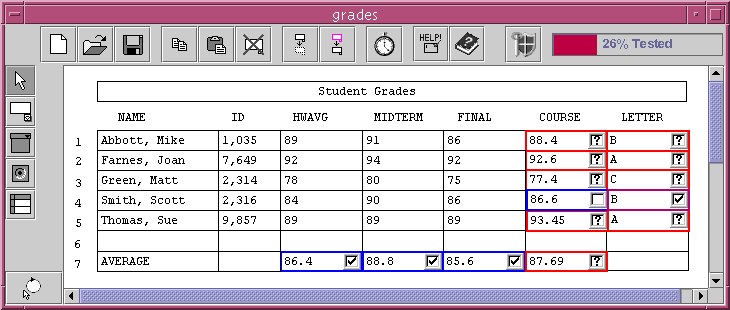
WYSIWYT approach, where checkmarks indicate testedness, question marks indicate that a cell needs testing, and colored borders indicate correctness.
Figure 10.13: WYSIWYT approach, where checkmarks indicate testedness, question marks indicate that a cell needs testing, and colored borders indicate correctness.
Using the UCheck feature to test for unit errors in a spreadsheet.
Figure 10.14: Using the UCheck feature to test for unit errors in a spreadsheet.

10.4.3 Debugging

After a programming error is detected, the next step is to remove it by debugging. Some of the debugging techniques used by professional developers have been adapted for use in EUP tools. In addition to inserting "print" statements that display the value of variables as a program executes, end user developers can step through instructions one at a time, watching for incorrect operations (Leshed et al 2008). Assertions represent another important traditional technique that has been adapted for use in EUP: a user can insert a conditional into the code, and the program will call attention to that point if the conditional evaluates to false at execution (Burnett et al 2003; Koesnandar et al. 2008; Scaffidi 2009).

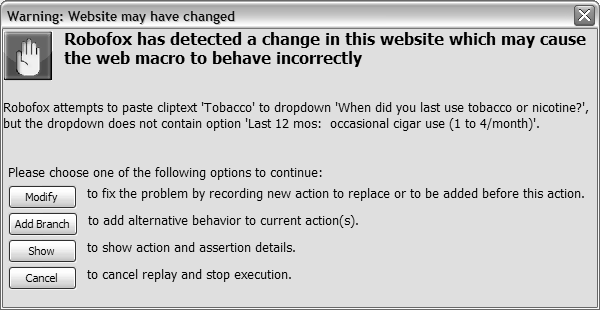
Several EUP tools provide tight integration between testing and debugging. For example, assertions can be inserted proactively when a program is created, in order to perform automatic tests and initiation of debugging if an assertion fails. For instance, when a web macro is initially created, it might perform properly; however, upon later execution, invalid outputs might arise either because of a bug in the macro itself or because of changes in the structure and content of websites (the macro inputs). An assertion can catch such errors that arise, halt execution, and bring them to the user's attention to prevent the macro from running awry (Figure 10.15). Several other EUP tools that support testing techniques, such as those mentioned above, also leverage test results to facilitate debugging. For example, once incorrect spreadsheet cells have been identified through testing, dependencies can be traced back automatically to identify and highlight the formulas that are most likely to have caused those erroneous outputs (Ayalew & Mittermeir 2003; Burnett et al 2003).

A new class of debugging tools based on question asking has recently emerged and has proven effective in EUSE. The first tool to take this approach was the Whyline, which was prototyped for the Alice programming environment that enables users to program animations (Ko & Myers 2004). Users execute their program, and when they see a behavior they have a question about, they press a "Why" button. This brings up a menu of "why did" and "why didn't" questions, organized according to the structure of the visible 3D objects manipulated by the program. Once the user selects a question, the system analyzes the program's execution history and generates an answer explaining the error in terms of the events that occurred during execution. The Whyline approach has also been applied to debugging other kinds of programs (e.g, Ko & Myers 2008; Kulesza et al 2009).

Popup window asking user to indicate whether and how a Robofox web macro should be modified due to a violated assertion.
Figure 10.15: Popup window asking user to indicate whether and how a Robofox web macro should be modified due to a violated assertion.

10.4.4 Reuse

After code is written, reuse can speed the creation of later programs. Supporting reuse of end-user programs is challenging because end-user developers rarely have the opportunity or training required to design highly reusable programs. Another challenge is that end-user developers can make mistakes when creating programs or other files for tailoring applications, and reusing these can propagate errors across an organization (Mackay 1990). Therefore, even though systems such as repositories or file servers can make it easy for end-user developers to post programs for others to reuse, it can be extremely difficult and time-consuming for other developers to evaluate the reusability of these programs. To help reduce the difficulty of reusing programs, models of what makes end-user programs reusable are now being developed in the hopes of helping users to search repositories for reusable programs related to the user's particular interests (Scaffidi et al 2010). Outside of repositories, other work has begun to explore how to help users to extract reusable pieces (Oney & Myers 2009).

10.5 The future and implications of EUD

As users continue to grow in number and diversity, EUD is likely to play an increasingly central role in shaping software to meet the broad, varied, rapidly changing needs of the world. Along the way, further research is needed to help end-user developers create and adapt new kinds of programs in new kinds of ways. For example, as the Web 2.0 era unfolds, researchers are investigating new ways of helping users to automate the synthesis of data from multiple websites through web macros and mashups (Scaffidi et al 2008; Zang et al 2008). Another ongoing shift is the rapidly-increasing role of small mobile computers, such as smart phones; work has recently begun on enabling end users to create "apps" or other programs for these devices (Google App Inventor 2010).

With the continually broadening scope and power of end-user programming, substantial additional attention to quality will become increasingly crucial. In particular, as users continue to interact with larger numbers of anonymous peers (e.g, through social networks or "app stores"), their code may become more visible to others and therefore more susceptible to attack. Moreover, since users can now share their programs with any person on the web, many more people could be affected by an error in an end-user programmer's code. Therefore, further research is needed to help end-user developers produce software with stronger guarantees of security and privacy, without interfering with the lightweight, iterative nature of the EUD lifecycle. Moreover, as massive amounts of data become accessible through the web to users, they may need better support for designing and implementing programs with increased scalability. It will be necessary for researchers to develop new approaches, since approaches used by professional software developers, such as buffer-overrun analysis for security or Big-O analysis for performance, may be irrelevant or too complex for the needs of end-user programmers.

More broadly, EUD's continuing development as a social phenomenon has important implications for the relationship between end users and professional software developers (Fischer & Giaccardi 2006, Costabile et al 2006). The rise of EUD to date enables end users to respond to professional developers' backlog of software work, and to the reality that professional software developers are not likely to understand and plan for every user requirement when developing software. With continuing advances in EUSE, end users will not only be able to create a variety of software on their own, but they will also to be able to assess and improve that software's quality on their own—so that they know to what extent to rely upon it, and what to do to increase the software's quality if needed. As a result, the fit between software's form and individual users' needs might be closer than has been possible before, vastly increasing the usefulness of software in peoples' lives.

10.6 Where to learn more

10.6.1 Books

  • Lieberman, H., Paterno, F., and Wulf, V. (eds.) 2006. End User Development, Springer.
  • Cypher, A, and Halbert, D. (eds.) 1993. Watch What I Do: Programming By Demonstration, The MIT Press.
  • Lieberman, H. (ed.) 2001. Your Wish Is My Command: Programming By Example, Morgan Kaufmann.

10.6.2 Relevant conferences and workshops

CHI - Human Factors in Computing Systems


VL-HCC - Symposium on Visual Languages and Human Centric Computing


Next conference is coming up 30 Sep 2012 in Innsbruck, Austria

ISEUD - International Symposium on End User Development


10.6.3 Relevant organizations


10.8 Commentary by Alan Blackwell

How to cite this commentary in your report

Picture of Alan Blackwell. © Alan Blackwell
I only have one big research question, but I attack it from a lot of different angles. The question is representation. How do people make, see and use things that carry meaning? The angles from which I attack my question include various ways in which representations are applied (including design processes, interacting with technology, computer programming, visualisation), vario...   
Read more >> 

Margaret Burnett and Chris Scaffidi provide an excellent overview of the evolving requirements in end-user development (EUD), and the technical approaches that have been taken to address them. In some ways, EUD provides one of the greatest challenges in interaction design - not because EUD tools are necessarily more complex than other specialist software categories, but because it can be harder to recognise the usability requirements. Designers in other fields must always stay alert to any presumption that customers will have exactly the same needs and habits as the designers themselves. However in the case of programming tools, it is all too easy for professional software developers to assume that every other person should approach his or her programming work in the same way as a professional does. Specialist research attention to end-users is necessary to avoid this trap when software professionals create new EUD technologies.

Successful EUD research can also provide benefits far beyond the target users. Software development can suffer from a "cobbler's children" effect - the usability of development environments is often poor by comparison to mass-market software categories where more has been invested in user research and interaction design. If EUD research leads to usability innovations for end-users, those same innovations can be later imported into mainstream software tools. A classic example is the Smalltalk language, which had superior usability because it had originally been motivated by the desire to create a programming language for children. Although children did find it useful, Smalltalk ultimately delivered far greater benefits by becoming one of the most usable object-oriented programming environments.

EUD is also providing new insights for HCI more generally. A recent focus on user-experience, and on products that meet market demand for "walk up and use" interfaces, has resulted in a lack of methods to understand requirements of more complex tasks, which involve interaction with information structures [1]. Simple media appliances and game-like interaction are welcome and desirable, but as Burnett and Scaffidi note in their conclusion, more sophisticated capabilities can also empower users. Lack of usability is frustrating, even in situations as commonplace as configuring social network privacy, or modifying a financial budget. The information structure in such tasks can be described as "programming-like", with more insight coming from EUD research than from standard usability methods. The field of Psychology of Programming [2] is able to provide guidance both to EUD, and to more domestic programming-like tasks, for example through the Cognitive Dimensions of Notations framework [3], and the Attention Investment model of abstraction use [4]. That field offers complementary insights to the very useful technical overview provided in this article.

References and links

1. Blackwell, A.F. & Fincher, S. (2010). PUX: Patterns of User Experience. interactions 17(2), 27-31.
http://www.cl.cam.ac.uk/~afb21/publications/BlackwellFincher-PUX.pdf

2. http://www.ppig.org/

3. Blackwell, A.F. and Green, T.R.G. (2003). Notational systems - the Cognitive Dimensions of Notations framework. In J.M. Carroll (Ed.) HCI Models, Theories and Frameworks: Toward a multidisciplinary science. San Francisco: Morgan Kaufmann, 103-134.
http://www.cl.cam.ac.uk/~afb21/publications/BlackwellGreen-CDsChapter.pdf

4. Blackwell, A.F. (2002). First steps in programming: A rationale for Attention Investment models. In Proceedings of the IEEE Symposia on Human-Centric Computing Languages and Environments, pp. 2-10.
http://www.cl.cam.ac.uk/~afb21/publications/HCC02a.pdf


10.9 Commentary by Mary Beth Rosson

How to cite this commentary in your report

Picture of Mary Beth Rosson. © Mary Beth Rosson
I am a Professor of Information Sciences and Technology, and Affiliate Professor of Instructional Systems in the College of Education. With Dr. John Carroll, I co-direct the Computer-Supported Collaboration and Learning (CSCL). I am also a founding member of PSU’s Center for Human-Computer Interaction, a loosely coupled university-wide consortia of researchers and educators pursuing topi...   
Read more >> 

End-user development is happening all around us. Burnett and Scaffidi do a good job of getting this message across, as well as surveying the many paths and supports for end users who participate in software development. But one issue that is hard to pin down is the why and who of EUD. HCI researchers have known for many years that people rarely become experts even in the use of their existing software applications (Rosson, 1984). So why would they choose to develop new software?

The answer to why lies in people’s real world goals. In some situations the task at hand depends entirely on building a computational artifact – e.g., creating a spreadsheet model, building a website for oneself or a group, learning science via a simulation, or connecting a set of equipment and their inputs and outputs for a lab experiment. Such situations qualify as EUD because the creator is not trained in software development and is building an artifact to meet other primary goals (e.g., education, business models). End users in these situations need tools and languages that can guide design: they must decompose their problems in a way that lets them map from domain knowledge and goals to computational abstractions and procedures. Sometimes a domain-specific language is the best approach, other times a generic creativity medium like a spreadsheet or web authoring tool.

An even larger set of EUD situations falls under the concept of tailoring as summarized by Burnett and Scaffidi. In these cases a person becomes dissatisfied with the functionality of a piece of software and changes it. This may be a change to how a bit of functionality is accessed or viewed (e.g., customization of keys, buttons or layout); a small and focused extension (e.g., defining a new document formatting style or recording steps to be repeated as a macro); or the redefinition of central aspects of an application (e.g., designing a better install configuration for a work group). Morch (1997) posits three levels of tailoring: customizing existing functionality; integrating functionality available elsewhere; and extending a system with new functionality created by end users. The degree of modification increases at each level, along with the impact of the sociotechnical context of use. That is, while simple customization may be entirely up to an individual user and his or her preferences, extending an organizational tool is the result of a complex social network of stakeholders, even if the actual change is enacted by a single individual (Mackay, 1990; Nardi, 1993). When a situation calls for tailoring, a critical aspect of the supporting EUD tools is integration with the abstractions and mechanisms of the existing application and associated practices (Costabile et al., 2006).

That leaves us with the question of who. Many scholars have pointed to the emergence of specific individuals in organizations, using metaphors like “gardener” to describe some people’s willingness to synthesize, abstract and support the computational needs present in their sociotechnical context (Mackay, 1990; Nardi, 1993). Others have noted the personal characteristics of individuals who appear intrinsically motivated to notice and explore new technology options (Rosson, Ballin & Nash, 2004; Zang & Rosson, 2010). The design of EUD languages and tools might certainly begin with an emphasis on evoking and supporting these tendencies. More worrying however, is evidence that some groups of end users (e.g., women and minorities) have a sort of learned avoidance about EUD, likely due to a myriad of personal, technical and social factors (Beckwith, 2007). The paradox of the active user (Carroll & Rosson, 1987) and the attention investment model (Blackwell, 2001) offer an essential lesson: only when EUD tools or languages can suggest or evoke benefits that are perceived to be significant enough – at the moment in time that an opportunity arises – should we expect to see a full range of end users enjoying the power that such tools bring.

References

  • Beckwith, L. 2007. Gender HCI Issues in End-User Programming. Ph.D. Dissertation, Computer Science Department, Oregon State University, Corvallis, OR.
  • Blackwell, A.F. 2002. First steps in programming: A rationale for attention investment models. In Proceedings of the IEEE Symposia on Human-Centric Computing Languages and Environments: VL/HCC 2002 (pp. 2-10). New York, NY: IEEE Computing Society.
  • Carroll, J. M., & Rosson, M. B. 1987. The paradox of the active user. In J.M. Carroll (Ed.), Interfacing Thought: Cognitive Aspects of Human-Computer Interaction. Cambridge, Mass: MIT Press (pp. 80-111).
  • Costabile, M.F., Piccino, A., Foglio, D. & Marcante, A. 2006. Supporting interaction and co-evolution of users and systems. Proceedings of Advanced Visual Interfaces: AVI 2006 (pp. 143-150). New York, NY: ACM Press.
  • Mackay, W. 1990. Users and Customizable Software: A Co-Adaptive Phenomenon. Ph.D. Dissertation, Computer Science Department, Massachusetts Institute of Technology, Cambridge, MA.
  • Mørch, A. 1997. Three levels of end-user tailoring: Customization, integration and extension. In M. Kyng & L. Mathiassen (Eds.), Computers and Context (pp. 51-76). Cambridge, MA: MIT Press.
  • Nardi, B. 1993. A Small Matter of Programming. Cambridge, MA: MIT Press.
  • Rosson, M. B. 1984. Effects of experience on learning, using, and evaluating a text-editor. Human Factors, 26(4), 463-475.
  • Rosson, M.B., Ballin, J., & Nash, H. 2004. Everyday programming: Challenges and opportunities for informal web development. Visual Languages and Human-Centric Computing 2004 (pp. 123-130). New York: IEEE.
  • Zang, N. & Rosson, M.B. 2010. Mashups for Web-active end users. In A. Cypher, M. Dontcheva, T. Lau & J. Nichols (Eds.), No Code Required: Giving Users Tools to Transform the Web (pp. 409-423). San Francisco, Morgan Kaufmann.
 

10.7 Behind the scenes

Interviewing Margaret Burnett and Chris Scaffidi in Rome, It...

Interviewing Margaret Burnett and Chris Scaffidi in Rome, It...

Interviewing Margaret Burnett and Chris Scaffidi in Rome, It...

Interviewing Margaret Burnett and Chris Scaffidi in Rome, It...


10.10 User-contributed notes

Give us your opinion! Do you have any comments/additions
that you would like other visitors to see?

 
comment You (your email) say: May 7th, 2012
#1
Add a thoughtful commentary or note to this page ! 

your homepage, facebook profile, twitter, or the like
will be spam-protected
How many?
= e.g. "6"
By submitting you agree to the Site Terms
 

10.11 References

 what's this?

Abraham, Robin and Erwig, Martin (2007): UCheck: A spreadsheet type checker for end users. In J. Vis. Lang. Comput., 18 (1) pp. 71-95

Spreadsheets are widely used, and studies have shown that most end-user spreadsheets contain non-trivial errors. Most of the currently available tools that try to mitigate this problem require varying levels of user intervention. This paper presents a system, called UCheck, that detects errors in spreadsheets automatically. UCheck carries out automatic header and unit inference, and reports unit errors to the users. UCheck is based on two static analyses phases that infer header and unit information for all cells in a spreadsheet. We have tested UCheck on a wide variety of spreadsheets and found that it works accurately and reliably. The system was also used in a continuing education course for high school teachers, conducted through Oregon State University, aimed at making the participants aware of the need for quality control in the creation of spreadsheets.

© All rights reserved Abraham and Erwig and/or their publisher

Abraham, Robin and Erwig, Martin (2004): Header and Unit Inference for Spreadsheets Through Spatial Analyses. In: VL-HCC 2004 - IEEE Symposium on Visual Languages and Human-Centric Computing 26-29 September, 2004, Rome, Italy. pp. 165-172

This paper describes the design and implementation of a unit and header inference system for spreadsheets. The system is based on a formal model of units that we have described in previous work. Since the unit inference depends on information about headers in a spreadsheet, a realistic unit inference system requires a method for automatically determining headers. The present paper describes (1) several spatial-analysis algorithms for header inference, (2) a framework that facilitates the integration of different algorithms, and (3) the implementation of the system. The combined header and unit inference system is fully integrated into Microsoft Excel and can be used to automatically identify various kinds of errors in spreadsheets. Test results show that the system works accurately and reliably.

© All rights reserved Abraham and Erwig and/or IEEE Computer Society

Ayalew, Yirsaw and Mittermeir, Roland (2008): Spreadsheet Debugging. In CoRR, 0

Ayalew, Y. and Mittermeir, R. (2003): Spreadsheet debugging. In: Proceedings of the European Spreadsheet Risks Interest Group 2003. pp. 22-23

Blackwell, Alan (2006): Gender in Domestic Programming: from Bricolage to Séances d'Essayage. In: CHI2006 Workshop on End User Software Engineering 2006.

Developments in ubiquitous computing mean that domestic appliances are increasingly programmable, providing new opportunities for end-user control and configuration. Unfortunately home programming, just as with end-user programming in professional contexts, is associated with stereotypically masculine learning styles. This is likely to result in future inequalities surrounding domestic technology. This paper summarises recent experimental evidence regarding the role of self-efficacy in learning through experimentation, demonstrates that similar genderlinked behaviour can be found in both domestic and professional contexts, and recommends a new approach to promoting such experimentation among women.

© All rights reserved Blackwell and/or his/her publisher

Blackwell, Alan (2004): End-user developers at home. In Communications of the ACM, 47 (9) pp. 65-66

Boal, Augusto (1992): Games for Actors and Non-Actors. Routledge

Boehner, Kirsten, dePaula, Rogerio, Dourish, Paul and Sengers, Phoebe (2007): How emotion is made and measured. In International Journal of Human-Computer Studies, 65 (4) pp. 275-291

How we design and evaluate for emotions depends crucially on what we take emotions to be. In affective computing, affect is often taken to be another kind of information -- discrete units or states internal to an individual that can be transmitted in a loss-free manner from people to computational systems and back. While affective computing explicitly challenges the primacy of rationality in cognitivist accounts of human activity, at a deeper level it often relies on and reproduces the same information-processing model of cognition. Drawing on cultural, social, and interactional critiques of cognition which have arisen in human-computer interaction (HCI), as well as anthropological and historical accounts of emotion, we explore an alternative perspective on emotion as interaction: dynamic, culturally mediated, and socially constructed and experienced. We demonstrate how this model leads to new goals for affective systems -- instead of sensing and transmitting emotion, systems should support human users in understanding, interpreting, and experiencing emotion in its full complexity and ambiguity. In developing from emotion as objective, externally measurable unit to emotion as experience, evaluation, too, alters focus from externally tracking the circulation of emotional information to co-interpreting emotions as they are made in interaction.

© All rights reserved Boehner et al. and/or Academic Press

Boehner, Kirsten, dePaula, Rogerio, Dourish, Paul and Sengers, Phoebe (2005): Affect: from information to interaction. In: Bertelsen, Olav W., Bouvin, Niels Olof, Krogh, Peter Gall and Kyng, Morten (eds.) Proceedings of the 4th Decennial Conference on Critical Computing 2005 August 20-24, 2005, Aarhus, Denmark. pp. 59-68

While affective computing explicitly challenges the primacy of rationality in cognitivist accounts of human activity, at a deeper level it relies on and reproduces the same information-processing model of cognition. In affective computing, affect is often seen as another kind of information - discrete units or states internal to an individual that can be transmitted in a loss-free manner from people to computational systems and back. Drawing on cultural, social, and interactional critiques of cognition which have arisen in HCI, we introduce and explore an alternative model of emotion as interaction: dynamic, culturally mediated, and socially constructed and experienced. This model leads to new goals for the design and evaluation of affective systems - instead of sensing and transmitting emotion, systems should support human users in understanding, interpreting, and experiencing emotion in its full complexity and ambiguity.

© All rights reserved Boehner et al. and/or ACM Press

Brancheau, James C. and Wetherbe, James C. (1987): Key Issues in Information Systems Management. In MIS Quarterly, 11 (1) pp. 23-45

Brancheau, James C., Janz, Brian D. and Wetherbe, James C. (1996): Key Issues in Information Systems Management: 1994-95 SIM Delphi Results. In MIS Quarterly, 20 (2) pp. 225-242

Bricklin, D., Frankston, B. and Fylstra, D. (1979). VisiCalc, Software Arts. Retrieved 31 May 2011 from http://www.bricklin.com/history/intro.htm

Burnett, Margaret M. (2010): End-User Software Engineering and Why it Matters. In JOEUC, 22 (1) pp. 1-22

End-user programming has become ubiquitous, so much so that there are more end-user programmers today than there are professional programmers. End-user programming empowersbut to do what? Make really bad decisions based on really bad programs? Enter software engineerings focus on quality. Considering software quality is necessary, because there is ample evidence that the programs end users create are filled with expensive errors. In this paper, I consider what happens when we add to end-user programming environments considerations of software quality, going beyond the create a program aspect of end-user programming. I describe a philosophy to software engineering for end users, and then survey several projects in this area. A basic premise is that end-user software engineering can only succeed to the extent that it respects the fact that the user probably has little expertise or even interest in software engineering.

© All rights reserved Burnett and/or his/her publisher

Burnett, Margaret M., Cook, Curtis R., Pendse, Omkar, Rothermel, Gregg, Summet, Jay and Wallace, Chris S. (2003): End-User Software Engineering with Assertions in the Spreadsheet Paradigm. In: Proceedings of the 25th International Conference on Software Engineering May 3-10, 2003, Portland, Oregon, USA. pp. 93-105

There has been little research on end-user program development beyond the activity of programming. Devising ways to address additional activities related to end-user program development may be critical, however, because research shows that a large proportion of the programs written by end users contain faults. Toward this end, we have been working on ways to provide formal "software engineering" methodologies to end-user programmers. This paper describes an approach we have developed for supporting assertions in end-user software, focusing on the spreadsheet paradigm. We also report the results of a controlled experiment, with 59 end-user subjects, to investigate the usefulness of this approach. Our results show that the end users were able to use the assertions to reason about their spreadsheets, and that doing so was tied to both greater correctness and greater efficiency.

© All rights reserved Burnett et al. and/or IEEE Computer Society

Burnett, Margaret M., Sheretov, Andrei, Ren, Bing and Rothermel, Gregg (2002): Testing Homogeneous Spreadsheet Grids with the "What You See Is What You Test" Methodology. In IEEE Trans. Software Eng., 28 (6) pp. 576-594

Although there has been recent research into ways to design environments that enable end users to create their own programs, little attention has been given to helping these end users systematically test their programs. To help address this need in spreadsheet systems—the most widely used type of end-user programming language—we previously introduced a visual approach to systematically testing individual cells in spreadsheet systems. However, the previous approach did not scale well in the presence of largely homogeneous grids, which introduce problems somewhat analogous to the array-testing problems of imperative programs. In this paper, we present two approaches to spreadsheet testing that explicitly support such grids. We present the algorithms, time complexities, and performance data comparing the two approaches. This is part of our continuing work to bring to end users at least some of the benefits of formalized notions of testing, without requiring knowledge of testing beyond a naive level.

© All rights reserved Burnett et al. and/or their publisher

Chambers, Chris and Erwig, Martin (2009): Automatic detection of dimension errors in spreadsheets. In J. Vis. Lang. Comput., 20 (4) pp. 269-283

We present a reasoning system for inferring dimension information in spreadsheets. This system can be used to check the consistency of spreadsheet formulas and thus is able to detect errors in spreadsheets. Our approach is based on three static analysis components. First, the spatial structure of the spreadsheet is analyzed to infer a labeling relationship among cells. Second, cells that are used as labels are lexically analyzed and mapped to potential dimensions. Finally, dimension information is propagated through spreadsheet formulas. An important aspect of the rule system defining dimension inference is that it works bi-directionally, that is, not only ‘‘downstream’’ from referenced arguments to the current cell, but also ‘‘upstream’’ in the reverse direction. This flexibility makes the system robust and turns out to be particularly useful in cases when the initial dimension information that can be inferred from headers is incomplete or ambiguous. We have implemented a prototype system as an add-in to Excel. In an evaluation of this implementation we were able to detect dimension errors in almost 50% of the investigated spreadsheets, which shows (i) that the system works reliably in practice and (ii) that dimension information can be well exploited to uncover errors in spreadsheets

© All rights reserved Chambers and Erwig and/or their publisher

Coblenz, Michael J., Ko, Andrew Jensen and Myers, Brad A. (2005): Using Objects of Measurement to Detect Spreadsheet Errors. In: VL-HCC 2005 - IEEE Symposium on Visual Languages and Human-Centric Computing 21-24 September, 2005, Dallas, TX, USA. pp. 314-316

There are many common errors in spreadsheets that traditional spreadsheet systems do not help users find. This paper presents a statically-typed spreadsheet language that adds additional information about the objects that spreadsheet values represent. By annotating values with both units and labels, users denote both the system of measurement in which the values are expressed as well as the properties of the objects to which the values refer. This information is used during computation to detect some invalid computations and allow users to identify properties of resulting values

© All rights reserved Coblenz et al. and/or IEEE Computer Society

Costabile, Maria Francesca, Fogli, Daniela, Mussio, Pero and Piccinno, Antonio (2006): End-user development: The software shaping workshop approach. In: Lieberman, Henry, Paterno, Fabio and Wulf, Volker (eds.). "End User Development (Human-Computer Interaction Series)". Springerpp. 183-205

In the Information Society, end-users keep increasing very fast in number, as well as in their demand with respect to the activities they would like to perform with computer environments, without being obliged to become computer specialists. There is a great request to provide end-users with powerful and flexible environments, tailorable to the culture, skills and needs of a very diverse end-user population. In this paper, we discuss a framework for End-User Development (EUD) and present our methodology for designing software environments that support the activities of a particular class of end-users, called domain-expert users, with the objective of making their work with the computer easier. Such environments are called Software Shaping Workshops, in analogy to artisan workshops: they provide users only with the necessary tools that allow them to accomplish their specific activities by properly shaping software artefacts without being lost in virtual space.

© All rights reserved Costabile et al. and/or Springer


Cypher, Allen (1993): Watch What I Do: Programming by Demonstration. Cambridge, MA, The MIT Press

Diaz, Paloma, Aedo, Ignacio and Rosson, Mary Beth (2008): Visual representation of web design patterns for end-users. In: Levialdi, Stefano (ed.) AVI 2008 - Proceedings of the working conference on Advanced Visual Interfaces May 28-30, 2008, Napoli, Italy. pp. 408-411

In this paper, we discuss the use of visual representations of web design patterns to help end-users and casual developers to identify the patterns they can apply in a specific project. The main goal is to promote design knowledge reuse by facilitating the identification of the right patterns, taking into account that these users have little or no knowledge about web design, and certainly not about design patterns, and that each pattern might include some trade-offs users should consider to make more rational decisions.

© All rights reserved Diaz et al. and/or ACM Press

Dittrich, Yvonne, Lindeberg, Olle and Lundberg, Lars (2006): End-user development as adaptive maintenance. In: Lieberman, Henry, Paterno, Fabio and Wulf, Volker (eds.). "End User Development (Human-Computer Interaction Series)". Springerpp. 295-313

The change of change applications to suit the needs of users in different places and facilitate development over time has long been a major challenge for software maintenance experts. In this chapter we take up tailoring as a means of making software flexible. Starting with two case studies— one taking up tailoring for different users and the other addressing changes over time—the article discusses problems related to both the use and development of a tailorable application. Developing tailorable software presents new challenges: how do you create a user-friendly tailoring interface? How do you decide what should be tailorable, and how do you create a software architecture that permits this? How do you ensure that the tailorable system gives acceptable performance? Our experience shows that the borders between maintenance and use become blurred since tailorability can replace maintenance by professional software engineers by tailoring by advanced users. Using our experience of the two selected cases, we identify and discuss five important issues to consider when designing and implementing tailorable systems in industrial setting

© All rights reserved Dittrich et al. and/or Springer


Erwig, Martin and Burnett, Margaret M. (2002): Adding Apples and Oranges. In: Krishnamurthi, Shriram and Ramakrishnan, C. R. (eds.) Practical Aspects of Declarative Languages, 4th International Symposium - PADL 2002 January 19-20, 2002, Portland, OR, USA. pp. 173-191

Fischer, Gerhard and Giaccardi, Elisa (2006): A framework for the future of end-user development. In: Lieberman, Henry, Paterno, Fabio and Wulf, Volker (eds.). "End User Development (Human-Computer Interaction Series)". Springerpp. 427-457

Fischer, Gerhard, Lemke, Andreas C., Mastaglio, Thomas W. and Morch, Anders (1990): Using Critics to Empower Users. In: Carrasco, Jane and Whiteside, John (eds.) Proceedings of the ACM CHI 90 Human Factors in Computing Systems Conference 1990, Seattle, Washington,USA. pp. 337-347

We describe the critiquing approach to building knowledge-based interactive systems. Critiquing supports computer users in their problem solving and learning activities. The challenges for the next generation of knowledge-based systems provide a context for the development of this paradigm. We discuss critics from the perspective of overcoming the problems of high-functionality computer systems, of providing a new class of systems to support learning, of extending applications-oriented construction kits to design environments, and of providing an alternative to traditional autonomous expert systems. One of the critiquing systems we have built -- JANUS, a critic for architectural design -- is used as an example of the key aspects of the critiquing process. We also survey additional critiquing systems developed in our and other research groups.

© All rights reserved Fischer et al. and/or ACM Press

Fisher, Marc, Rothermel, Gregg, Brown, Darren, Cao, Mingming, Cook, Curtis R. and Burnett, Margaret M. (2006): Integrating automated test generation into the WYSIWYT spreadsheet testing methodology. In ACM Trans. Softw. Eng. Methodol., 15 (2) pp. 150-194

Spreadsheet languages, which include commercial spreadsheets and various research systems, have had a substantial impact on end-user computing. Research shows, however, that spreadsheets often contain faults. Thus, in previous work we presented a methodology that helps spreadsheet users test their spreadsheet formulas. Our empirical studies have shown that end users can use this methodology to test spreadsheets more adequately and efficiently; however, the process of generating test cases can still present a significant impediment. To address this problem, we have been investigating how to incorporate automated test case generation into our testing methodology in ways that support incremental testing and provide immediate visual feedback. We have used two techniques for generating test cases, one involving random selection and one involving a goal-oriented approach. We describe these techniques and their integration into our testing environment, and report results of an experiment examining their effectiveness and efficiency.

© All rights reserved Fisher et al. and/or their publisher

Google (2010). Google App Inventor. Retrieved [Date unavailable] from Google:

Ichbiah, Daniel and Knepper, Susan (1992): The Making of Microsoft: How Bill Gates and His Team Created the World's Most Successful Software Company. Prima Lifestyles

Jones, Simon L. Peyton, Blackwell, Alan and Burnett, Margaret M. (2003): A user-centred approach to functions in Excel. In SIGPLAN Notices, 38 (9) pp. 165-176

We describe extensions to the Excel spreadsheet that integrate userdefined functions into the spreadsheet grid, rather than treating them as a “bolt-on”. Our first objective was to bring the benefits of additional programming language features to a system that is often not recognised as a programming language. Second, in a project involving the evolution of a well-established language, compatibility with previous versions is a major issue, and maintaining this compatibility was our second objective. Third and most important, the commercial success of spreadsheets is largely due to the fact that many people find them more usable than programming languages for programming-like tasks. Thus, our third objective (with resulting constraints) was to maintain this usability advantage. Simply making Excel more like a conventional programming language would not meet these objectives and constraints. We have therefore taken an approach to our design work that emphasises the cognitive requirements of the user as a primary design criterion. The analytic approach that we demonstrate in this project is based on recent developments in the study of programming usability, including the Cognitive Dimensions of Notations and the Attention Investment model of abstraction use. We believe that this approach is also applicable to the design and

© All rights reserved Jones et al. and/or ACM Press

Ko, Andrew J. and Myers, Brad A. (2004): Designing the whyline: a debugging interface for asking questions about program behavior. In: Dykstra-Erickson, Elizabeth and Tscheligi, Manfred (eds.) Proceedings of ACM CHI 2004 Conference on Human Factors in Computing Systems April 24-29, 2004, Vienna, Austria. pp. 151-158

Debugging is still among the most common and costly of programming activities. One reason is that current debugging tools do not directly support the inquisitive nature of the activity. Interrogative Debugging is a new debugging paradigm in which programmers can ask why did and even why didn't questions directly about their program's runtime failures. The Whyline is a prototype Interrogative Debugging interface for the Alice programming environment that visualizes answers in terms of runtime events directly relevant to a programmer's question. Comparisons of identical debugging scenarios from user tests with and without the Whyline showed that the Whyline reduced debugging time by nearly a factor of 8, and helped programmers complete 40% more tasks.

© All rights reserved Ko and Myers and/or ACM Press

Ko, Andrew Jensen and Myers, Brad A. (2008): Debugging reinvented: asking and answering why and why not questions about program behavior. In: Schäfer, Wilhelm, Dwyer, Matthew B. and Gruhn, Volker (eds.) 30th International Conference on Software Engineering ICSE 2008 May 10-18, 2008, Leipzig, Germany. pp. 301-310

When software developers want to understand the reason for a program's behavior, they must translate their questions about the behavior into a series of questions about code, speculating about the causes in the process. The Whyline is a new kind of debugging tool that avoids such speculation by instead enabling developers to select a question about program output from a set of why did and why didn't questions derived from the program's code and execution. The tool then finds one or more possible explanations for the output in question, using a combination of static and dynamic slicing, precise call graphs, and new algorithms for determining potential sources of values and explanations for why a line of code was not reached. Evaluations of the tool on one task showed that novice programmers with the Whyline were twice as fast as expert programmers without it. The tool has the potential to simplify debugging in many software development contexts.

© All rights reserved Ko and Myers and/or ACM Press

Ko, Andrew J., Abraham, Robin, Beckwith, Laura, Blackwell, Alan, Burnett, Margaret M., Erwig, Martin, Scaffidi, Christopher, Lawrance, Joseph, Lieberman, Henry, Myers, Brad A., Rosson, Mary Beth, Rothermel, Gregg, Shaw, Mary and Wiedenbeck, Susan (2011): The State of the Art in End-User Software Engineering. In ACM Computing Surveys, 43 (3) pp. 1-44

Most programs today are written not by professional software developers, but by people with expertise in other domains working towards goals for which they need computational support. For example, a teacher might write a grading spreadsheet to save time grading, or an interaction designer might use an interface builder to test some user interface design ideas. Although these end-user programmers may not have the same goals as professional developers, they do face many of the same software engineering challenges, including understanding their requirements, as well as making decisions about design, reuse, integration, testing, and debugging. This article summarizes and classifies research on these activities, defining the area of End-User Software Engineering (EUSE) and related terminology. The article then discusses empirical research about end-user software engineering activities and the technologies designed to support them. The article also addresses several crosscutting issues in the design of EUSE tools, including the roles of risk, reward, and domain complexity, and self-efficacy in the design of EUSE tools and the potential of educating users about software engineering principles.

© All rights reserved Ko et al. and/or ACM Press

Koesnandar, Andhy, Elbaum, Sebastian G., Rothermel, Gregg, Hochstein, Lorin, Scaffidi, Christopher and Stolee, Kathryn T. (2008): Using assertions to help end-user programmers create dependable web macros. In: Harrold, Mary Jean and Murphy, Gail C. (eds.) Proceedings of the 16th ACM SIGSOFT International Symposium on Foundations of Software Engineering November 9-14, 2008, Atlanta, Georgia, USA. pp. 124-134

Web macros give web browser users ways to "program" tedious tasks, allowing those tasks to be repeated more quickly and reliably than when performed by hand. Web macros face dependability problems of their own, however: changes in websites or failure on the part of end-user programmers to anticipate possible macro behaviors can cause macros to act incorrectly, often in ways that are difficult to detect. We would like to provide at least some of the benefits of software engineering methodologies to the creators of web macros. To do this we adapt assertions to web-macro programming scenarios. While assertions are well-known to professional software engineers, our web macro assertions are unique in their focus on website evolution, are generated automatically, and encode the expectations and assumptions of a rapidly growing group of users who often have limited formal programming expertise. We have integrated our techniques for assertion generation and evaluation into a web macro tool, and performed an empirical study investigating its use. Our results show that the assertions can help web macro users detect macro failures and correct macro faults.

© All rights reserved Koesnandar et al. and/or ACM Press

Kulesza, Todd, Wong, Weng-Keen, Stumpf, Simone, Perona, Stephen, White, Rachel, Burnett, Margaret M., Oberst, Ian and Ko, Andrew J. (2009): Fixing the program my computer learned: barriers for end users, challenges for the machine. In: Proceedings of the 2009 International Conference on Intelligent User Interfaces 2009. pp. 187-196

The results of a machine learning from user behavior can be thought of as a program, and like all programs, it may need to be debugged. Providing ways for the user to debug it matters, because without the ability to fix errors users may find that the learned program's errors are too damaging for them to be able to trust such programs. We present a new approach to enable end users to debug a learned program. We then use an early prototype of our new approach to conduct a formative study to determine where and when debugging issues arise, both in general and also separately for males and females. The results suggest opportunities to make machine-learned programs more effective tools.

© All rights reserved Kulesza et al. and/or their publisher

Leshed, Gilly, Haber, Eben M., Matthews, Tara and Lau, Tessa (2008): CoScripter: automating & sharing how-to knowledge in the enterprise. In: Proceedings of ACM CHI 2008 Conference on Human Factors in Computing Systems April 5-10, 2008. pp. 1719-1728

Modern enterprises are replete with numerous online processes. Many must be performed frequently and are tedious, while others are done less frequently yet are complex or hard to remember. We present interviews with knowledge workers that reveal a need for mechanisms to automate the execution of and to share knowledge about these processes. In response, we have developed the CoScripter system (formerly Koala [11]), a collaborative scripting environment for recording, automating, and sharing web-based processes. We have deployed CoScripter within a large corporation for more than 10 months. Through usage log analysis and interviews with users, we show that CoScripter has addressed many user automation and sharing needs, to the extent that more than 50 employees have voluntarily incorporated it into their work practice. We also present ways people have used CoScripter and general issues for tools that support automation and sharing of how-to knowledge.

© All rights reserved Leshed et al. and/or ACM Press

Letondal, Catherine (2006): Participatory programming: Developing programmable bioinformatics tools for end-users. In: Lieberman, Henry, Paterno, Fabio and Wulf, Volker (eds.). "End User Development (Human-Computer Interaction Series)". Springerpp. 207-242

We describe participatory programming as a process that spans design, programming, use and tailoring of software. This process, that includes end-users at each stage, integrates participatory design and programmability. Programmability, as a property that relies on a reflective architecture, aims to let the end-users evolve the tools themselves according to their current, specific needs, and to let them control better the way results are computed. We present an environment that results from this approach, called biok, developed for researchers in biology, which is both domain-oriented and open to full programming.

© All rights reserved Letondal and/or Springer


Lieberman, Henry, Paterno, Fabio, Klann, Markus and Wulf, Volker (2006): End-user development: An emerging paradigm. End User Development. In: Lieberman, Henry, Paterno, Fabio and Wulf, Volker (eds.). "End User Development (Human-Computer Interaction Series)". Springerpp. 1-8

Liu, Hugo and Lieberman, Henry (2005): Metafor: visualizing stories as code. In: Amant, Robert St., Riedl, John and Jameson, Anthony (eds.) Proceedings of the 2005 International Conference on Intelligent User Interfaces January 10-13, 2005, San Diego, California, USA. pp. 305-307

Mackay, Wendy E. (1990): Patterns of Sharing Customizable Software. In: Halasz, Frank (ed.) Proceedings of the 1990 ACM conference on Computer-supported cooperative work October 07 - 10, 1990, Los Angeles, California, United States. pp. 209-221

The act of customizing software is generally viewed as a solitary activity that allows users to express individual preferences. In this study, users at two different research sites, working with two different kinds of customizable software, were found to actively share their customization files with each other. This sharing allowed the members of each organization to establish and perpetuate informally-defined norms of behavior. A small percentage of people within the organization were responsible for most of the sharing. One group of these were highly-skilled software engineers, who were usually the first to try new software. They used customization as a way to experiment with and learn about the software and made their files available to others through various broadcast mechanisms. This group did not try to determine whether their customizations were useful to other users. The second group were less skilled technically but much more interested in interpreting the needs of their colleagues and creating customization files tailored to those needs. They acted as translators between the highly technical group and the rest of the organization. The spontaneous sharing of customization files within an organization has implications for both organizations and for software designers. Managers should 1) recognize and support the role of translators, 2) recognize that not all sharing is beneficial, and 3) provide opportunities for the exchange of customization files and innovations among members of the organization. Software designers should 1) provide tools that allow users to evaluate the effectiveness of their customizations through reflective software, 2) provide well-tested examples of customization files with the first release of the software, 3) explicitly support sharing of customizations, and 4) p

© All rights reserved Mackay and/or ACM Press

McDaniel, Richard G. and Myers, Brad A. (1999): Getting More Out of Programming-by-Demonstration. In: Altom, Mark W. and Williams, Marian G. (eds.) Proceedings of the ACM CHI 99 Human Factors in Computing Systems Conference May 15-20, 1999, Pittsburgh, Pennsylvania. pp. 442-449

Programming-by-demonstration (PBD) can be used to create tools and methods that eliminate the need to learn difficult computer languages. Gamut is a PBD tool that nonprogrammers can use to create a broader range of interactive software, including games, simulations, and educational software, than they can with other PBD tools. To do this, Gamut provides advanced interaction techniques that make it easier for a developer to express all aspects of an application. These techniques include a simplified way to demonstrate new examples, called "nudges," and a way to highlight objects to show they are important. Also, Gamut includes new objects and metaphors like the deck-of-cards metaphor for demonstrating collections of objects and randomness, guide objects for demonstrating relationships that the system would find too difficult to guess, and temporal ghosts which simplify showing relationships with the recent past. These techniques were tested in a formal setting with nonprogrammers to evaluate their effectiveness.

© All rights reserved McDaniel and Myers and/or ACM Press

Morch, Anders and Mehandjiev, Nikolay D. (2000): Tailoring as Collaboration: The Mediating Role of Multiple Representations and Application Units. In Computer Supported Cooperative Work, 9 (1) pp. 75-100

In this paper we see tailoring as indirect long-term collaboration between developers and users: initiated by developers when they build software systems, and responded to by end users when they later tailor the systems. We have identified two features we consider important when supporting this kind of collaboration: multiple representations and application units. Their main benefit is that they can enhance communication between developers and users, hence making it easier for users to do the tailoring. We present two tailorable systems we have built to test these ideas. One of the systems (ECHOES) is a collaborative system based on multiple representations, and the other system (BasicDraw) is an individual productivity tool based on multiple representations and application units. We discuss lessons learned from the two projects and suggest directions for future work, including identifying some challenges that need to be overcome in order to bring end-user tailoring out of the prototyping laboratory and into user organizations.

© All rights reserved Morch and and/or Kluwer Academic Publishers

Nardi, Bonnie A. (1993): A Small Matter of Programming: Perspectives on End User Computing. Cambridge, Massachusetts, MIT Press

A SMALL MATTER OF PROGRAMMING asks why it has been so difficult for end users to command programming power and explores the problems of end user-driven application development that must be solved to afford end users greater computational power. Drawing on empirical research on existing end user systems, A SMALL MATTER OF PROGRAMMING analyzes cognitive, social, and technical issues of end user programming. In particular, it examines the importance of task-specific programming languages, visual application frameworks, and collaborative work practices for end user computing, with the goal of helping designers and programmers understand and better satisfy the needs of end users who want the capability to create, customize, and extend their applications software. The ideas in the book are based on the author's research on two successful end user programming systems -- spreadsheets and CAD systems -- as well as other empirical research. Nardi concentrates on broad issues in end user programming, especially end users' strengths and problems, introducing tools and techniques as they are related to higher-level user issues.

© All rights reserved Nardi and/or MIT Press


Newman, Mark W., Lin, James J. W., Hong, Jason I. and Landay, James A. (2003): DENIM: An Informal Web Site Design Tool Inspired by Observations of Practice. In Human-Computer Interaction, 18 (3) pp. 259-324

Through a study of Web site design practice, we observed that designers employ multiple representations of Web sites as they progress through the design process and that these representations allow them to focus on different aspects of the design. In particular, we observed that Web site designers focus their design efforts at 3 different levels of granularity-site map, storyboard, and individual page-and that designers sketch at all levels during the early stages of design. Sketching on paper is especially important during the early phases of a project, when designers wish to explore many design possibilities quickly without focusing on low-level details. Existing Web design tools do not support such exploration tasks well, nor do they adequately integrate multiple site representations. Informed by these observations we developed DENIM: an informal Web site design tool that supports early phase information and navigation design of Web sites. It supports sketching input, allows design at different levels of granularity, and unifies the levels through zooming. Designers are able to interact with their sketched designs as if in a Web browser, thus allowing rapid creation and exploration of interactive prototypes. Based on an evaluation with professional designers as well as usage feedback from users who have downloaded DENIM from the Internet, we have made numerous improvements to the system and have received many positive reactions from designers who would like to use a system like DENIM in their work.

© All rights reserved Newman et al. and/or Taylor and Francis

Oney, Stephen and Myers, Brad A. (2009): FireCrystal: Understanding interactive behaviors in dynamic web pages. In: IEEE Symposium on Visual Languages and Human-Centric Computing - VL/HCC 2009 20-24 September, 2009, Corvallis, OR, USA. pp. 105-108

Panko, R. (1998): What we know about spreadsheet errors. In Journal of End User Computing, 10 pp. 15-21

Powell, Stephen G. and Baker, Kenneth R. (2003): The Art of Modeling with Spreadsheets: Management Science, Spreadsheet Engineering, and Modeling Craft. Wiley

Repenning, Alexander and Perrone, Corrina (2000): Programming by Analogous Examples. In Communications of the ACM, 43 (3) pp. 90-97

Resnick, Mitchel, Maloney, John, Monroy-Hernández, Andrés, Rusk, Natalie, Eastmond, Evelyn, Brennan, Karen, Millner, Amon, Rosenbaum, Eric, Silver, Jay S., Silverman, Brian and Kafai, Yasmin B. (2009): Scratch: programming for all. In Communications of the ACM, 52 (11) pp. 60-67

Ronen, Boaz, Palley, Michael A. and Jr., Henry C. Lucas (1989): Spreadsheet Analysis and Design. In Communications of the ACM, 32 (1) pp. 84-93

Rosson, Mary Beth, Sinha, Hansa and Edor, Tisha (2010): Design Planning in End-User Web Development: Gender, Feature Exploration and Feelings of Success. In: Hundhausen, Christopher D., Pietriga, Emmanuel, Diaz, Paloma and Rosson, Mary Beth (eds.) IEEE Symposium on Visual Languages and Human-Centric Computing, VL/HCC 2010 21-25 September 2010, 2010, Leganés-Madrid, Spain. pp. 141-148

We report an empirical study of nonprogrammers who built a database-centered web application using an end-user web development tool. Half of the users spent time planning their project by creating a concept map before starting the programming; across planning conditions, half of the users were males and half female. Participants who did concept mapping or who were male were more attracted to database programming; however planning did not affect feelings of success and in general females felt more successful than males. We discuss the implications of these findings for work on gender and for future EUP tools and training.

© All rights reserved Rosson et al. and/or IEEE

Rosson, Mary Beth, Carroll, John M., Seals, Cheryl D. and Lewis, Tracy L. (2002): Community design of community simulations. In: Proceedings of DIS02: Designing Interactive Systems: Processes, Practices, Methods, & Techniques 2002. pp. 75-83

We report on a participatory design workshop in which residents of a community collaborated in learning about and designing projects for a visual simulation environment. Nine participants (five middle school teachers, four senior citizens) first conducted a participatory evaluation of a tutorial developed for the Stagecast Creator simulation tool. They then worked in pairs to brainstorm ideas for Creator simulation projects that would help raise and promote discussion of issues relevant to their community. After sharing these ideas, each pair chose 2-3 simulation ideas to refine as a specification for subsequent implementation. We discuss the participants' learning and design activities, as well as their contributions to our long term goal of supporting cross-generational collaboration and learning through community simulation projects.

© All rights reserved Rosson et al. and/or ACM Press

Rosson, Mary Beth, Sinha, Hansa, Bhattacharya, Mithu and Zhao, Dejin (2008): Design planning by end-user web developers. In J. Vis. Lang. Comput., 19 (4) pp. 468-484

Rosson, Mary Beth, Sinha, Hansa, Bhattacharya, Mithu and Zhao, Dejin (2007): Design Planning in End-User Web Development. In: VL-HCC 2007 - IEEE Symposium on Visual Languages and Human-Centric Computing 23-27 September, 2007, Coeur dAlene, Idaho, USA. pp. 189-196

We report an exploratory study of the impacts of design planning on end users asked to develop a simple interactive web application. Some participants were asked to create a conceptual map to plan their projects and others to write scenarios; a third group was asked to do whatever they found useful. We describe the planning that each group underwent, how they approached the web development task, and their reactions to the experience afterwards. We also discuss how participants' gender and experience was related to their web development activities.

© All rights reserved Rosson et al. and/or IEEE Computer Society

Scaffidi, Christopher (2009). Topes: Enabling End-User Programmers to Validate and Reformat Data, PhD Dissertation, Technical Report CMU-ISR-09-105. Institute for Software Research (ISR), Carnegie Mellon University

Millions of people rely on software for help with everyday tasks. For example, a teacher might create a spreadsheet to compute grades, and a human resources worker might create a web form to collect contact information from co-workers. Yet, too often, software applications offer poor support for automating certain activities, which people must do manually. In particular, many tasks require validating and reformatting short human-readable strings drawn from categories such as company names and employee ID numbers. These string-containing categories have three traits that existing applications do not reflect. First, each category can be multi-format in that each of its instances can be written several different ways. Second, each category can include questionable values that are unusual yet still valid. During user tasks, such strings often are worthy of doublechecking, as they are neither obviously valid nor obviously invalid. Third, each category is application-agnostic in that its rules for validating and reformatting strings are not specific to one software application—rather, its rules are agreed upon implicitly or explicitly by members of an organization or society. For example, a web form might have a field for entering Carnegie Mellon office phone numbers like “8-3564” or “412-268-3564”. Current web form design tools offer no convenient way to create code for putting strings into a consistent format, nor do they help users create code to detect inputs that are unusual but maybe valid, such as “7-3564” (since our office phone numbers rarely start with “7”). In order to help users with their tasks, this dissertation presents a new kind of abstraction called a “tope” and a supporting development environment. Each tope describes how to validate and reformat instances of a data category. Topes are sufficiently expressive for creating useful, accurate rules for validating and reformatting a wide range of data categories commonly encountered by end users. By creating and applying topes, end users can validate and reformat strings more quickly and effectively than they can with currently-practiced techniques. Tope implementations are reusable across applications and by different people, highlighting the leverage provided by end-user programming research aimed at developing new kinds of application-agnostic abstractions. The topes model demonstrates that such abstractions can be successful if they model a shallow level of semantics, thereby retaining usability without sacrificing usefulness for supporting users’ real-world goals

© All rights reserved Scaffidi and/or his/her publisher

Scaffidi, Christopher, Cypher, Allen, Elbaum, Sebastian G., Koesnandar, Andhy and Myers, Brad A. (2008): Using scenario-based requirements to direct research on web macro tools. In J. Vis. Lang. Comput., 19 (4) pp. 485-498

Scaffidi, Christopher, Bogart, Christopher, Burnett, Margaret M., Cypher, Allen, Myers, Brad A. and Shaw, Mary (2010): Using traits of web macro scripts to predict reuse. In J. Vis. Lang. Comput., 21 (5) pp. 277-291

Scaffidi, Christopher, Myers, Brad A. and Shaw, Mary (2009): Fast, Accurate Creation of Data Validation Formats by End-User Developers. In: Pipek, Volkmar, Rosson, Mary Beth, Ruyter, Boris E. R. de and Wulf, Volker (eds.) End-User Development - 2nd International Symposium - IS-EUD 2009 March 2-4, 2009, Siegen, Germany. pp. 242-261

Scaffidi, Christopher, Shaw, Mary and Myers, Brad A. (2005): Estimating the Numbers of End Users and End User Programmers. In: VL-HCC 2005 - IEEE Symposium on Visual Languages and Human-Centric Computing 21-24 September, 2005, Dallas, TX, USA. pp. 207-214

Segal, Judith (2007): Some Problems of Professional End User Developers. In: VL-HCC 2007 - IEEE Symposium on Visual Languages and Human-Centric Computing 23-27 September, 2007, Coeur dAlene, Idaho, USA. pp. 111-118

Wilson, Aaron, Burnett, Margaret M., Beckwith, Laura, Granatir, Orion, Casburn, Ledah, Cook, Curtis, Durham, Mike and Rothermel, Gregg (2003): Harnessing curiosity to increase correctness in end-user programming. In: Cockton, Gilbert and Korhonen, Panu (eds.) Proceedings of the ACM CHI 2003 Human Factors in Computing Systems Conference April 5-10, 2003, Ft. Lauderdale, Florida, USA. pp. 305-312

Won, Markus, Stiemerling, Oliver and Wulf, Volker (2006): Component-based approaches to tailorable systems. In: Lieberman, Henry, Paterno, Fabio and Wulf, Volker (eds.). "End User Development (Human-Computer Interaction Series)". Springerpp. 115-141

Flexibility is one of the most striking features of modern software. As the idea of integrating components is easily understood by programmers as well as end users, component architectures seem to be very promising to serve as a technological basis. In this paper we give an overview of our work in the last years. A component model called FLEXIBEANS has been designed with the special notion to develop highly flexible and tailorable applications. The FREEVOLVE platform then serves as an environment in which compositions can be run and tailored. The second part of the paper deals with the development and evaluation of different tailoring environments in which end users can compose their own applications or tailor existing ones. Users tests showed that besides a coherent technical basis and a manageable visual tailoring environment, there is a need for additional support techniques. We discuss how techniques to support users’ individual and collective tailoring activities can be integrated into the user interface.

© All rights reserved Won et al. and/or Springer


Wulf, Volker, Pipek, Volkmar and Won, Markus (2008): Component-based tailorability: Enabling highly flexible software applications. In International Journal of Human-Computer Studies, 20 (1) pp. 1-22

Component technologies are perceived as an important means to keep software architectures flexible. Flexibility offered by component technologies typically addresses software developers at design time. However, the design of software which should support social systems, such as work groups or communities, also demands 'use-time', or technically spoken, 'run-time' flexibility. In this paper, we summarize a decade of research efforts on component-based approaches to flexibilize groupware applications at run-time. We address the user as a 'casual programmer' who develops and individualizes software for his work context. To deal with the challenges of run-time flexibility, we developed a design approach which covers three levels: software architecture, user interface, and collaboration support. With regard to the software architecture, a component model, called FlexiBeans, has been developed. The FreEvolve platform serves as an environment in which component-based applications can be tailored at run-time. Additionally, we have developed three different types of graphical user interfaces, enabling users to tailor their applications by recomposing components. To enable collaborative tailoring activities, we have integrated functions that allow sharing component structures among users. We also present different types of support techniques which are integrated into the user interface in order to enable users' individual and collaborative tailoring activities. We conclude by elaborating on the notion of 'software infrastructure' which offers a holistic approach to support design activities of professional and non-professional programmers.

© All rights reserved Wulf et al. and/or Academic Press

Yang, Sherry, Burnett, Margaret M., DeKoven, Elyon and Zloof, Moshé M. (1997): Representation Design Benchmarks: A Design-Time Aid for VPL Navigable Static Representations. In J. Vis. Lang. Comput., 8 (5) pp. 563-599

A weakness of many interactive visual programming languages (VPLs) is their static representations. Lack of an adequate static representation places a heavy cognitive burden on a VPL’s programmers, because they must remember potentially long dynamic sequences of screen displays in order to understand a previously written program. However, although this problem is widely acknowledged, research on how to design better static representations for interactive VPLs is still in its infancy. Building upon the cognitive dimensions developed for programming languages by cognitive psychologists Green and others, we have developed a set of concrete benchmarks for VPL designers to use when designing new static representations. These benchmarks provide design-time information that can be used to improve a VPL’s static representation. ( 1997 Academic Press

© All rights reserved Yang et al. and/or their publisher

Zang, Nan, Rosson, Mary Beth and Nasser, Vincent (2008): Mashups: who? what? why?. In: Proceedings of ACM CHI 2008 Conference on Human Factors in Computing Systems April 5-10, 2008. pp. 3171-3176

In recent years major web services have opened their systems to outside use through the implementation of public APIs. As a result, web developers have begun to experiment with mashups -- software applications that merge separate APIs and data sources into one integrated interface. Because the APIs and data sources are publicly available, in principle anyone can create a mashup. However, because relatively advanced programming languages are required to integrate these APIs, creating a mashup still requires considerable programming expertise. In this paper we share the results of an exploratory study of web developers and their experiences with building mashups. We profile the characteristics of mashup developers, examine the mashups they create, and the reasons they create mashups. From the results of this initial survey we outline a course for future research.

© All rights reserved Zang et al. and/or ACM Press

Changes to this chapter

15 Dec 2011: Added

About this chapter

Author(s): Margaret M. Burnett and Christopher Scaffidi
Editors: Anne Marie Kanstrup, Mads Soegaard and Rikke Friis Dam
Reviewer 1: Name suppressed
Reviewer 2: Name suppressed

Peer-review is based on the reviewing guidelines and coordinated by the Reviewing Board.
Commentaries by: Alan Blackwell and Mary Beth Rosson
This encyclopedia chapter has undergone double-blinded peer-review by two reviewers based on the reviewing guidelines, language copy-editing, typesetting, and reference validation.

How to cite/reference this page
URL: http://www.interaction-design.org/encyclopedia/end-user_development.html

Licensed through a Creative Commons licence Open Access

We believe in Open Access and the democratization of knowledge. Unfortunately, world class educational materials are normally hidden behind payment systems or in expensive textbooks. If you want this to change, you should help us out! Kind thoughts are not enough - you need to act!
Copyright Terms
We do NOT use copyright as a restrictive instrument, but as an instrument to protect the author against misuse while encouraging redistribution and use of his/her work. As such, these copyright terms are designed for the author and the reader, not the publisher and the profit.

Except as otherwise noted, this page/work is copyright of Margaret M. Burnett and Christopher Scaffidi and The Interaction-Design.org Foundation (Chr. Molbechs Vej 4, DK-8000 Aarhus C, Denmark) and is licensed under the following terms:
  1. The Creative Commons Attribution-NoDerivs Licence
  2. The Interaction-Design.org Addendum to the Creative Commons licence

...with the exception of materials described in...:

  1. "Exceptions"

Furthermore, your use of Interaction-Design.org signifies your consent to:

  1. the "Site Terms and Conditions"
i. Creative Commons Attribution-NoDerivs 3.0 Unported

The Creative Commons Attribution-NoDerivs 3.0 Unported License

THE WORK (AS DEFINED BELOW) IS PROVIDED UNDER THE TERMS OF THIS CREATIVE COMMONS PUBLIC LICENSE ("CCPL" OR "LICENSE"). THE WORK IS PROTECTED BY COPYRIGHT AND/OR OTHER APPLICABLE LAW. ANY USE OF THE WORK OTHER THAN AS AUTHORIZED UNDER THIS LICENSE OR COPYRIGHT LAW IS PROHIBITED.

BY EXERCISING ANY RIGHTS TO THE WORK PROVIDED HERE, YOU ACCEPT AND AGREE TO BE BOUND BY THE TERMS OF THIS LICENSE. TO THE EXTENT THIS LICENSE MAY BE CONSIDERED TO BE A CONTRACT, THE LICENSOR GRANTS YOU THE RIGHTS CONTAINED HERE IN CONSIDERATION OF YOUR ACCEPTANCE OF SUCH TERMS AND CONDITIONS.

1. Definitions

  1. "Adaptation" means a work based upon the Work, or upon the Work and other pre-existing works, such as a translation, adaptation, derivative work, arrangement of music or other alterations of a literary or artistic work, or phonogram or performance and includes cinematographic adaptations or any other form in which the Work may be recast, transformed, or adapted including in any form recognizably derived from the original, except that a work that constitutes a Collection will not be considered an Adaptation for the purpose of this License. For the avoidance of doubt, where the Work is a musical work, performance or phonogram, the synchronization of the Work in timed-relation with a moving image ("synching") will be considered an Adaptation for the purpose of this License.
  2. "Collection" means a collection of literary or artistic works, such as encyclopedias and anthologies, or performances, phonograms or broadcasts, or other works or subject matter other than works listed in Section 1(f) below, which, by reason of the selection and arrangement of their contents, constitute intellectual creations, in which the Work is included in its entirety in unmodified form along with one or more other contributions, each constituting separate and independent works in themselves, which together are assembled into a collective whole. A work that constitutes a Collection will not be considered an Adaptation (as defined above) for the purposes of this License.
  3. "Distribute" means to make available to the public the original and copies of the Work through sale or other transfer of ownership.
  4. "Licensor" means the individual, individuals, entity or entities that offer(s) the Work under the terms of this License.
  5. "Original Author" means, in the case of a literary or artistic work, the individual, individuals, entity or entities who created the Work or if no individual or entity can be identified, the publisher; and in addition (i) in the case of a performance the actors, singers, musicians, dancers, and other persons who act, sing, deliver, declaim, play in, interpret or otherwise perform literary or artistic works or expressions of folklore; (ii) in the case of a phonogram the producer being the person or legal entity who first fixes the sounds of a performance or other sounds; and, (iii) in the case of broadcasts, the organization that transmits the broadcast.
  6. "Work" means the literary and/or artistic work offered under the terms of this License including without limitation any production in the literary, scientific and artistic domain, whatever may be the mode or form of its expression including digital form, such as a book, pamphlet and other writing; a lecture, address, sermon or other work of the same nature; a dramatic or dramatico-musical work; a choreographic work or entertainment in dumb show; a musical composition with or without words; a cinematographic work to which are assimilated works expressed by a process analogous to cinematography; a work of drawing, painting, architecture, sculpture, engraving or lithography; a photographic work to which are assimilated works expressed by a process analogous to photography; a work of applied art; an illustration, map, plan, sketch or three-dimensional work relative to geography, topography, architecture or science; a performance; a broadcast; a phonogram; a compilation of data to the extent it is protected as a copyrightable work; or a work performed by a variety or circus performer to the extent it is not otherwise considered a literary or artistic work.
  7. "You" means an individual or entity exercising rights under this License who has not previously violated the terms of this License with respect to the Work, or who has received express permission from the Licensor to exercise rights under this License despite a previous violation.
  8. "Publicly Perform" means to perform public recitations of the Work and to communicate to the public those public recitations, by any means or process, including by wire or wireless means or public digital performances; to make available to the public Works in such a way that members of the public may access these Works from a place and at a place individually chosen by them; to perform the Work to the public by any means or process and the communication to the public of the performances of the Work, including by public digital performance; to broadcast and rebroadcast the Work by any means including signs, sounds or images.
  9. "Reproduce" means to make copies of the Work by any means including without limitation by sound or visual recordings and the right of fixation and reproducing fixations of the Work, including storage of a protected performance or phonogram in digital form or other electronic medium.

2. Fair Dealing Rights. Nothing in this License is intended to reduce, limit, or restrict any uses free from copyright or rights arising from limitations or exceptions that are provided for in connection with the copyright protection under copyright law or other applicable laws.

3. License Grant. Subject to the terms and conditions of this License, Licensor hereby grants You a worldwide, royalty-free, non-exclusive, perpetual (for the duration of the applicable copyright) license to exercise the rights in the Work as stated below:

  1. to Reproduce the Work, to incorporate the Work into one or more Collections, and to Reproduce the Work as incorporated in the Collections; and,
  2. to Distribute and Publicly Perform the Work including as incorporated in Collections.
  3. For the avoidance of doubt:

    1. Non-waivable Compulsory License Schemes. In those jurisdictions in which the right to collect royalties through any statutory or compulsory licensing scheme cannot be waived, the Licensor reserves the exclusive right to collect such royalties for any exercise by You of the rights granted under this License;
    2. Waivable Compulsory License Schemes. In those jurisdictions in which the right to collect royalties through any statutory or compulsory licensing scheme can be waived, the Licensor waives the exclusive right to collect such royalties for any exercise by You of the rights granted under this License; and,
    3. Voluntary License Schemes. The Licensor waives the right to collect royalties, whether individually or, in the event that the Licensor is a member of a collecting society that administers voluntary licensing schemes, via that society, from any exercise by You of the rights granted under this License.

The above rights may be exercised in all media and formats whether now known or hereafter devised. The above rights include the right to make such modifications as are technically necessary to exercise the rights in other media and formats, but otherwise you have no rights to make Adaptations. Subject to Section 8(f), all rights not expressly granted by Licensor are hereby reserved.

4. Restrictions. The license granted in Section 3 above is expressly made subject to and limited by the following restrictions:

  1. You may Distribute or Publicly Perform the Work only under the terms of this License. You must include a copy of, or the Uniform Resource Identifier (URI) for, this License with every copy of the Work You Distribute or Publicly Perform. You may not offer or impose any terms on the Work that restrict the terms of this License or the ability of the recipient of the Work to exercise the rights granted to that recipient under the terms of the License. You may not sublicense the Work. You must keep intact all notices that refer to this License and to the disclaimer of warranties with every copy of the Work You Distribute or Publicly Perform. When You Distribute or Publicly Perform the Work, You may not impose any effective technological measures on the Work that restrict the ability of a recipient of the Work from You to exercise the rights granted to that recipient under the terms of the License. This Section 4(a) applies to the Work as incorporated in a Collection, but this does not require the Collection apart from the Work itself to be made subject to the terms of this License. If You create a Collection, upon notice from any Licensor You must, to the extent practicable, remove from the Collection any credit as required by Section 4(b), as requested.
  2. If You Distribute, or Publicly Perform the Work or Collections, You must, unless a request has been made pursuant to Section 4(a), keep intact all copyright notices for the Work and provide, reasonable to the medium or means You are utilizing: (i) the name of the Original Author (or pseudonym, if applicable) if supplied, and/or if the Original Author and/or Licensor designate another party or parties (e.g., a sponsor institute, publishing entity, journal) for attribution ("Attribution Parties") in Licensor's copyright notice, terms of service or by other reasonable means, the name of such party or parties; (ii) the title of the Work if supplied; (iii) to the extent reasonably practicable, the URI, if any, that Licensor specifies to be associated with the Work, unless such URI does not refer to the copyright notice or licensing information for the Work. The credit required by this Section 4(b) may be implemented in any reasonable manner; provided, however, that in the case of a Collection, at a minimum such credit will appear, if a credit for all contributing authors of the Collection appears, then as part of these credits and in a manner at least as prominent as the credits for the other contributing authors. For the avoidance of doubt, You may only use the credit required by this Section for the purpose of attribution in the manner set out above and, by exercising Your rights under this License, You may not implicitly or explicitly assert or imply any connection with, sponsorship or endorsement by the Original Author, Licensor and/or Attribution Parties, as appropriate, of You or Your use of the Work, without the separate, express prior written permission of the Original Author, Licensor and/or Attribution Parties.
  3. Except as otherwise agreed in writing by the Licensor or as may be otherwise permitted by applicable law, if You Reproduce, Distribute or Publicly Perform the Work either by itself or as part of any Collections, You must not distort, mutilate, modify or take other derogatory action in relation to the Work which would be prejudicial to the Original Author's honor or reputation.

5. Representations, Warranties and Disclaimer

UNLESS OTHERWISE MUTUALLY AGREED TO BY THE PARTIES IN WRITING, LICENSOR OFFERS THE WORK AS-IS AND MAKES NO REPRESENTATIONS OR WARRANTIES OF ANY KIND CONCERNING THE WORK, EXPRESS, IMPLIED, STATUTORY OR OTHERWISE, INCLUDING, WITHOUT LIMITATION, WARRANTIES OF TITLE, MERCHANTIBILITY, FITNESS FOR A PARTICULAR PURPOSE, NONINFRINGEMENT, OR THE ABSENCE OF LATENT OR OTHER DEFECTS, ACCURACY, OR THE PRESENCE OF ABSENCE OF ERRORS, WHETHER OR NOT DISCOVERABLE. SOME JURISDICTIONS DO NOT ALLOW THE EXCLUSION OF IMPLIED WARRANTIES, SO SUCH EXCLUSION MAY NOT APPLY TO YOU.

6. Limitation on Liability. EXCEPT TO THE EXTENT REQUIRED BY APPLICABLE LAW, IN NO EVENT WILL LICENSOR BE LIABLE TO YOU ON ANY LEGAL THEORY FOR ANY SPECIAL, INCIDENTAL, CONSEQUENTIAL, PUNITIVE OR EXEMPLARY DAMAGES ARISING OUT OF THIS LICENSE OR THE USE OF THE WORK, EVEN IF LICENSOR HAS BEEN ADVISED OF THE POSSIBILITY OF SUCH DAMAGES.

7. Termination

  1. This License and the rights granted hereunder will terminate automatically upon any breach by You of the terms of this License. Individuals or entities who have received Collections from You under this License, however, will not have their licenses terminated provided such individuals or entities remain in full compliance with those licenses. Sections 1, 2, 5, 6, 7, and 8 will survive any termination of this License.
  2. Subject to the above terms and conditions, the license granted here is perpetual (for the duration of the applicable copyright in the Work). Notwithstanding the above, Licensor reserves the right to release the Work under different license terms or to stop distributing the Work at any time; provided, however that any such election will not serve to withdraw this License (or any other license that has been, or is required to be, granted under the terms of this License), and this License will continue in full force and effect unless terminated as stated above.

8. Miscellaneous

  1. Each time You Distribute or Publicly Perform the Work or a Collection, the Licensor offers to the recipient a license to the Work on the same terms and conditions as the license granted to You under this License.
  2. If any provision of this License is invalid or unenforceable under applicable law, it shall not affect the validity or enforceability of the remainder of the terms of this License, and without further action by the parties to this agreement, such provision shall be reformed to the minimum extent necessary to make such provision valid and enforceable.
  3. No term or provision of this License shall be deemed waived and no breach consented to unless such waiver or consent shall be in writing and signed by the party to be charged with such waiver or consent.
  4. This License constitutes the entire agreement between the parties with respect to the Work licensed here. There are no understandings, agreements or representations with respect to the Work not specified here. Licensor shall not be bound by any additional provisions that may appear in any communication from You. This License may not be modified without the mutual written agreement of the Licensor and You.
  5. The rights granted under, and the subject matter referenced, in this License were drafted utilizing the terminology of the Berne Convention for the Protection of Literary and Artistic Works (as amended on September 28, 1979), the Rome Convention of 1961, the WIPO Copyright Treaty of 1996, the WIPO Performances and Phonograms Treaty of 1996 and the Universal Copyright Convention (as revised on July 24, 1971). These rights and subject matter take effect in the relevant jurisdiction in which the License terms are sought to be enforced according to the corresponding provisions of the implementation of those treaty provisions in the applicable national law. If the standard suite of rights granted under applicable copyright law includes additional rights not granted under this License, such additional rights are deemed to be included in the License; this License is not intended to restrict the license of any rights under applicable law.
ii. The Interaction-Design.org Addendum to the Creative Commons licence

The Interaction-Design.org Addendum to the Creative Commmons licence is a placeholder for additions to the Creative Commons licence, which are deemed necessary to include in consideration of Danish law and the operation of this site and The Interaction-Design.org Foundation.

1. Attribution

Attribution must be clearly given, i.e. the author's name, the title and URL of this work/publication/web page must clearly appear. The attribution must be given in a manner appropriate to the medium in which it is given: For example, electronic copies must include a clickable URL, which does not use the nofollow attribute value.

2. Updates

The Interaction-Design.org Foundation reserves the unilateral right to update, modify, change and alter its Site Terms and Conditions as well as Copyright Terms at any time. All such updates, modifications, changes and alterations are binding on all users and browsers of Interaction-Design.org and will be posted here.

iii. Exceptions

Exceptions

In some cases, a page/work may include content, such as an image, that is not covered by the copyright terms (i.e. "The Interaction-Design.org Addendum to the Creative Commons licence" and the "Creative Commons Attribution-NoDerivs 3.0 Unported"). When this is the case, we clearly label the content. For images, we also include the copyright label inside the image file (i.e. the full-resolution version) in metadata types like EXIF, IPTC, and XMP. We only include and label content with the following copyright terms:

  1. CC-Att-SA:
        Creative Commons Attribution-ShareAlike 3.0 Unported
        Legal Code (full licence text): http://creativecommons.org/licenses/by-sa/3.0/
  2. CC-Att-SA-2:
        Creative Commons Attribution-ShareAlike 2.0 Unported
        Legal Code (full licence text): http://creativecommons.org/licenses/by-sa/2.0/
  3. CC-Att-SA-3:
        Creative Commons Attribution-ShareAlike 3.0 Unported
        Legal Code (full licence text): http://creativecommons.org/licenses/by-sa/3.0/
  4. CC-Att-SA-1:
        Creative Commons Attribution-ShareAlike 1.0 Unported
        Legal Code (full licence text): http://creativecommons.org/licenses/by-sa/1.0/
  5. CC-Att-ND:
        Creative Commons Attribution-NoDerivs 3.0 Unported
        Legal Code (full licence text): http://creativecommons.org/licenses/by-nd/3.0/
  6. CC-Att-ND-1:
        Creative Commons Attribution-NoDerivs 1.0 Unported
        Legal Code (full licence text): http://creativecommons.org/licenses/by-nd/1.0/
  7. CC-Att-ND-2:
        Creative Commons Attribution-NoDerivs 2.0 Unported
        Legal Code (full licence text): http://creativecommons.org/licenses/by-nd/2.0/
  8. CC-Att-ND-3:
        Creative Commons Attribution-NoDerivs 3.0 Unported
        Legal Code (full licence text): http://creativecommons.org/licenses/by-nd/3.0/
  9. CC-Att:
        Creative Commons Attribution 3.0 Unported
        Legal Code (full licence text): http://creativecommons.org/licenses/by/3.0/
  10. CC-Att-2:
        Creative Commons Attribution 2.0 Unported
        Legal Code (full licence text): http://creativecommons.org/licenses/by/2.0/
  11. CC-Att-3:
        Creative Commons Attribution 3.0 Unported
        Legal Code (full licence text): http://creativecommons.org/licenses/by/3.0/
  12. CC-Att-1:
        Creative Commons Attribution 1.0 Unported
        Legal Code (full licence text): http://creativecommons.org/licenses/by/1.0/
  13. AllRightsReserved:
        All Rights Reserved. Materials used with permission. Permission to use has been granted exclusively to The Interaction-Design.org Foundation and/or the author of the given work/chapter, in which the copyrighted material is used. This permission constitutes a non-transferable license and, as such, only applies to The Interaction-Design.org Foundation. Therefore, no part of this material may be reproduced, stored in a retrieval system or transmitted in any form or by any means, electronic, recording or otherwise without prior written permission of the copyright holder.
  14. AllRightsReservedUsedWithoutPermission:
        All Rights Reserved. Non-free, copyrighted materials used without permission. The materials are used without permission of the copyright holder because the materials meet the legal criteria for Fair Use and/or because The Interaction-Design.org Foundation has not been able to contact the copyright holder. The most common cases are: 1) Cover art: Cover art from various items, for identification only in the context of critical commentary of that item (not for identification without critical commentary). 2) Team and corporate logos: For identification. 3) Other promotional material: Posters, programs, billboards, ads: For critical commentary. 4) Film and television screen shots: For critical commentary and discussion of the cinema and television. 5) Screenshots from software products: For critical commentary. 6) Paintings and other works of visual art: For critical commentary, including images illustrative of a particular technique or school. 7) Images with iconic status or historical importance: As subjects of commentary. 8) Images that are themselves subject of commentary.
  15. Pd:
        Public Domain (information that is common property and contains no original authorship)
  16. Trademarks and logos:
        All trademarks, logos, service marks, collective marks, design rights, personality rights or similar rights that are mentioned, used or cited on Interaction-Design.org are the property of their respective owners. The use of any trademark on Interaction-Design.org does not vest in the author or The Interaction-Design.org Foundation any trademark ownership rights in such trademarks, nor does the use of such trademarks imply any affiliation with or endorsement of The Interaction-Design.org Foundation and its authors by such owners. As such The Interaction-Design.org Foundation can not grant any rights to use any otherwise protected materials. Your use of any such or similar incorporeal property is at your own risk.

In addition, content linked from a page is not covered by one of our licenses unless specifically noted. For example, pages may link to videos or slide decks that are not covered. The design of Interaction-Design.org (graphics, html, client-side scripts, etc.) is copyright of Mads Soegaard.

iv. The Site Terms and Conditions

Please read these terms and conditions (the "Terms") carefully before using Interaction-Design.org. By using Interaction-Design.org you signify your consent to these Terms. If you do not agree to the Terms please do not use Interaction-Design.org. The Terms addresses your legal rights and obligations and includes important disclaimers and choice of law and forum provisions. Please read carefully.

1. Ownership of Interaction-Design.org

Interaction-Design.org is owned and operated by The Interaction-Design.org Foundation, a privately held corporation incorporated under the laws of Denmark, with office in Aarhus, Denmark.

Address:
The Interaction-Design.org Foundation
Att: Mads Soegaard
Chr. Molbechs Vej 4
DK-8000 Aarhus C.
Denmark

2. Choice of Law and Forum Provisions

Interaction-Design.org is run by The Interaction-Design.org Foundation, a privately held corporation residing in Aarhus, Denmark. You agree that these Terms and your use of Interaction-Design.org are governed by the laws of Denmark. You hereby consent to the exclusive jurisdiction and venue of the courts, tribunals, agencies and other dispute resolution organizations in Denmark in all disputes

  1. arising out of, relating to, or concerning Interaction-Design.org, The Interaction-Design.org Foundation, and/or these Terms
  2. in which Interaction-Design.org, The Interaction-Design.org Foundation, and/or these Terms is an issue or a material fact
  3. or in which Interaction-Design.org, The Interaction-Design.org Foundation, and/or these Terms is referenced in a paper filed in a court, tribunal, agency or other dispute resolution organization.

The Interaction-Design.org Foundation has endeavoured to comply with all legal requirements known to it in creating and maintaining Interaction-Design.org, but makes no representation that materials on Interaction-Design.org are appropriate or available for use in any particular jurisdiction. You are responsible for compliance with applicable laws. Any use in contravention of this provision or any provision of these Terms is at your own risk and, if any part of these Terms is invalid or unenforceable under applicable law, the invalid or unenforceable provision will be deemed superseded by a valid, enforceable provision that most closely matches the intent of the original provision and the remainder of these Terms shall govern such use.

3. Liability

Your use of and browsing Interaction-Design.org is at your own risk. The Interaction-Design.org Foundation does not warrant that the software used for Interaction-Design.org, and the information, material, and content on it, or any other services provided by means of Interaction-Design.org are error-free, or that their use will be uninterrupted. The Interaction-Design.org Foundation expressly disclaims all warranties related to the above-mentioned subject matter, including, without limitation, those of accuracy, condition, merchantability and fitness for particular purpose. Notwithstanding anything to the contrary on Interaction-Design.org, in no event shall The Interaction-Design.org Foundation be liable for any loss of profits, revenues, indirect, special, incidental, consequential, or other similar damages arising out of or in connection with Interaction-Design.org or out of the use of any of the services proposed by means of Interaction-Design.org.

4. Updates

The Interaction-Design.org Foundation reserves the unilateral right to update, modify, change and alter its Site Terms and Conditions as well as Copyright Terms at any time. All such updates, modifications, changes and alterations are binding on all users and browsers of Interaction-Design.org and will be posted here.

5. Legal Disclaimer

The Interaction-Design.org Foundation and its authors make no representations as to accuracy, completeness, currentness, suitability, or validity of any information, material, or content on Interaction-Design.org.

THE MATERIAL AND CONTENT POSTED ON INTERACTION-DESIGN.ORG ARE PROVIDED "AS IS" WITHOUT ANY EXPRESS WARRANTY OR IMPLIED WARRANTY OF ANY KIND INCLUDING WARRANTIES OF MERCHANTABILITY, NON-INFRINGEMENT OF INTELLECTUAL PROPERTY, OR FITNESS FOR ANY PARTICULAR PURPOSE. IN NO EVENT SHALL THE INTERACTION-DESIGN.ORG FOUNDATION BE LIABLE FOR ANY DAMAGES WHATSOEVER (INCLUDING, WITHOUT LIMITATION, DAMAGES FOR LOSS OF PROFITS, BUSINESS INTERRUPTION, LOSS OF INFORMATION) ARISING OUT OF THE USE OF OR INABILITY TO USE THE MATERIALS, EVEN IF THE INTERACTION-DESIGN.ORG FOUNDATION HAS BEEN ADVISED OF THE POSSIBILITY OF SUCH DAMAGES.

Because some jurisdictions prohibit the exclusion or limitation of liability for consequential and or incidental damages, the above limitation may not apply to you. Furthermore, The Interaction-Design.org Foundation does not warrant the accuracy or completeness of information of links or other items contained within these materials that have been provided by third parties.

6. Provision regarding change in attribution of copyrighted materials

Please contact us at mads@interaction-design.org if you, or your organization, wish to correct or change attribution or presentation of any image/material used on Interaction-Design.org, which you, or your organization, are the rightful copyright holder of. We will request that you submit proof of your ownership of the copyright on this material but will act immediately on any reasonable request.

7. Notice and prodecure for claims of copyright infringement

Every effort has been made by the individual contributing authors as well as The Interaction-Design.org Foundation to discover and contact copyright holders of artwork/illustrations/content used on Interaction-Design.org. To the extent that a copyright holder could not be found or an inadvertent permissions or copyright error was made, The Interaction-Design.org Foundation stands ready to remove content upon notice and request by a copyright holder. In the case that you believe that any content or other material provided through Interaction-Design.org infringes your copyright, you should notify The Interaction-Design.org Foundation of your infringement claim in accordance with the procedure set forth below.

We will process each notice of alleged infringement which The Interaction-Design.org Foundation receives and take appropriate action in accordance with applicable intellectual property laws. A notification of claimed copyright infringement should be emailed to mads@interaction-design.org (subject: "Takedown Request"). You may also contact us by mail at:

The Interaction-Design.org Foundation
Att: Mads Soegaard
Chr. Molbechs Vej 4
DK-8000 Aarhus C.
Denmark

To be effective, the notification must be in writing and contain the following information:

  1. an electronic or physical signature of the copyright owner or the person authorized to act on behalf of the owner of the copyright interest
  2. a description of the copyrighted work that you claim has been infringed
  3. a description of where the material that you claim is infringing is located on Interaction-Design.org that is reasonably sufficient to enable us to identify and locate the material;
  4. how The Interaction-Design.org Foundation can contact you, such as your address, telephone number, and email address
  5. a written statement by you that you have a good faith belief that the disputed use is not authorized by the copyright owner, its agent, or the law
  6. if you represent a publisher, a written statement by you that you have a good faith belief that the material has not been placed in the public domain, or licenced under another licence, before you acquired the copyright as this would possibly invalidate your copyright
  7. and a statement by you, made under penalty of perjury, that the above information in your notice is accurate and that you are the copyright owner or authorized to act on the copyright owner's behalf.

8. Trademarks and other rights

All trademarks, logos, service marks, collective marks, design rights, personality rights or similar rights that are mentioned, used or cited on Interaction-Design.org are the property of their respective owners. The use of any trademark on Interaction-Design.org does not vest in the author or The Interaction-Design.org Foundation any trademark ownership rights in such trademarks, nor does the use of such trademarks imply any affiliation with or endorsement of The Interaction-Design.org Foundation and its authors by such owners. As such The Interaction-Design.org Foundation can not grant any rights to use any otherwise protected materials. Your use of any such or similar incorporeal property is at your own risk.

9. Screenshots

Screenshots of copyrighted computer software, for which the copyright is held by the author(s) or the company that created the software, is believed to fall under the fair use doctrine in the US (and similar laws in other countries). It is believed that reproduction for purposes such as criticism, comment, news reporting, teaching, or research is not copyright infringement. If you reuse screenshots, as well as any other information on Interaction-Design.org, you do so at your own risk and under the copyright laws of your country.

10. Copyright of Abstracts

Abstracts in the Wiki Bibliography (/references/) are submitted by their authors who use the wiki to make their research as accessible as possible. When a page on Interaction-Design.org cites/references/lists a work from the bibliography, its abstract is included. However, abstracts have varying copyrights depending which publisher the work is published through. You should assume that an abstract is copyright, all rights reserved, of its publisher and/or author and therefore always use/cite abstracts according to Fair Use. You may visit the publisher's website to learn about the specific copyright terms (e.g. ACM, IEEE, or Springer) or contact the author directly. Bottom line: Cite/use abstracts according to the principles of fair use as it may otherwise be construed as a copyright infringement and subject to legal action.

11. User Submissions / User Content

You understand and acknowledge that additions to the Wiki Bibliography (including article abstracts), additions the Conference Calendar (including conference descriptions), user-contributed notes on each page (including text, photographs, graphics), or other materials posted by users on Interaction-Design.org ("Content") are the sole responsibility of the person from whom such Content originated. This means that you, and not The Interaction-Design.org Foundation, are entirely responsible for all Content that you upload, post or otherwise make available to other users of Interaction-Design.org.

When submitting content to Interaction-Design.org, you agree to not:

  1. impersonate any person or entity or falsely state or otherwise misrepresent your affiliation with a person or entity;
  2. upload, post or otherwise make available any Content that you do not have a right to make available under any law or under contractual or fiduciary relationships (such as inside information, proprietary and confidential information learned or disclosed as part of employment relationships or under nondisclosure agreements);
  3. upload, post or otherwise make available any Content that infringes any patent, trademark, trade secret, copyright or other proprietary rights ("Rights") of any party;
  4. upload, post or otherwise make available any Content that is unlawful, harmful, threatening, abusive, harassing, tortious, defamatory, vulgar, obscene, libelous, invasive of another's privacy, hateful, or racially, ethnically or otherwise objectionable;

You acknowledge that The Interaction-Design.org Foundation shall have the right to remove any Content that violates these Site Terms and Conditions or is otherwise objectionable.

12. Third Party Websites

If we provide links or pointers to other websites, no inference or assumption should be made that The Interaction-Design.org Foundation operates, controls, or is otherwise connected with these websites. When you click on a link within Interaction-Design.org, we will not warn you that you have left a Site and are subject to the terms and conditions (including privacy policies) of the destination website. In some cases it may be less obvious than others that you have left a Site and reached another website. Please be careful to read the terms of use and privacy policy of any website before you provide any confidential information or engage in any transactions. You should not rely on these Terms for another website. The Interaction-Design.org Foundation is not responsible for the content or practices of any other website. By using Interaction-Design.org, you acknowledge and agree that The Interaction-Design.org Foundation is not responsible or liable to you for any content or other materials hosted and served from any third party website.

13. Email communication: Confidential and proprietary information notice

Email messages sent from members of The Interaction-Design.org Foundation, including emails generated from the use of the interaction-design.org website, are proprietary to The Interaction-Design.org Foundation, and are intended solely for the use of the individual to whom they are addressed. Such messages may contain privileged or confidential information and should not be circulated or used for any purpose other than for what they are intended. If you receive a message from a member of The Interaction-Design.org Foundation in error, please notify the sender immediately. If you are not the intended recipient, you are hereby notified that you are strictly prohibited from using, copying, altering, or disclosing the contents of the message. The Interaction-Design.org Foundation accepts no responsibility for loss or damage arising from the use of the information transmitted by email message including damage from virus.

14. Usage conditions

Please make sure that you understand that the information provided by The Interaction-Design.org Foundation is being provided freely, and that no kind of agreement or contract is created between you and the owners, partners, users, or authors of this site, the owners of the servers upon which it is housed, the individual contributors of the The Interaction-Design.org Foundation, any project administrators, sysops or anyone else who is in any way connected with this project. If you choose to use or copy anything from from this site it does not create or imply any contractual or extracontractual liability on the part of The Interaction-Design.org Foundation or any of its members, partners, sponsors, contributors or other users. Your use of any such or similar incorporeal property is at your own risk.

15. Legal Disputes

Any dispute arising from the use of Interaction-Design.org or the interpretation of the terms is governed by the laws of Denmark, and shall be settled by the courts of Denmark. All communications regarding legal matters must be made in writing to

The Interaction-Design.org Foundation
Att: Mads Soegaard
Chr. Molbechs Vej 4
DK-8000 Aarhus C.
Denmark


About the authors

Picture of Margaret M. Burnett. © Margaret M. Burnett
Margaret Burnett is a Professor of Computer Science at the School of Electrical Engineering and Computer Science at Oregon State University. Her current research focuses on end-user programming, end-user software engineering, information foraging theory as applied to programming, and gender issues in those contexts. She has a long history of research in these issues and others relating t...   
Read more >> 
Picture of Christopher Scaffidi. © Christopher Scaffidi
Christopher Scaffidi is currently an Assistant Professor of Computer Science in the School of EECS at Oregon State University. His research interests are where human-computer interaction and software engineering intersect. Most of his current projects aim to help software users to create code for themselves, and to effectively share that code with one another. He is presently serving ...   
Read more >> 

Commentaries by:


Alan Blackwell

Picture of Alan Blackwell.

I only have one big research question, but I attack it from a lot of different angles. The question is representation. How do people make, see and use things that carry meaning? The angles from which I attack my question include various ways in which r...

More about Alan >>
 

Mary Beth Rosson

Picture of Mary Beth Rosson.

I am a Professor of Information Sciences and Technology, and Affiliate Professor of Instructional Systems in the College of Education. With Dr. John Carroll, I co-direct the Computer-Supported Collaboration and Learning (CSCL). I am also a founding member of P...

More about Mary >>
 

Editors of this chapter:


Anne Marie Kanstrup

Picture of Anne Marie Kanstrup. Copyright of Anne Marie Kanstrup and Interaction-Design.org through the Creative Commons Share-Alike licence.

Anne Marie Kanstrup is Associate Professor at the Dept. of Communications, Aalbo...

Read more >>
 

Mads Soegaard

Picture of Mads Soegaard. Copyright of Mads Soegaard and Interaction-Design.org through the Creative Commons Share-Alike licence.

Previously, I've worked at The Danish National Technological Institute worki...

Read more >>
 

Rikke Friis Dam

Picture of Rikke Friis Dam. Copyright of Rikke Friis Dam and Interaction-Design.org through the Creative Commons Share-Alike licence.

Rikke Dam holds a Master's Degree in philosophy from the University of Aarhus, a...

Read more >>
 

Peer Reviewers

Reviewer 1: Name suppressed
Reviewer 2: Name suppressed

Peer-review is based on the reviewing guidelines and coordinated by the Reviewing Board.

Get Notified!

Get notified when new chapters are added to the encyclopedia!

Your Email
 

Featured chapter

Authoritative overview of Social Computing by Tom Erickson - veteran researcher at IBM Research Lab. It includes 9 HD videos filmed in Copenhagen.

Read Thomas's chapter